
TL;DR:
- Preparing an online affidavit in Ontario requires precise adherence to legal procedures, including proper wording, timely signing, and correct use of templates. Remote notarization via approved platforms is legally accepted and involves identity verification, electronic signing, and electronic sealing, typically costing $10 to $30. Ensuring accuracy and compliance before filing prevents rejection and saves time, making professional review highly recommended for complex or contested cases.
Preparing a legal document under oath sounds straightforward until you submit it and get it rejected. If you need to know how to prepare an online affidavit in Ontario, the stakes are real. A poorly worded statement, a missing signature, or an improperly commissioned document can delay court proceedings, cost you money, or worse, expose you to legal liability. This guide walks you through every stage of the process, from gathering your documents to filing your sworn statement, so you get it right the first time.
Table of Contents
- Key takeaways
- How to prepare an online affidavit: what you need before you start
- Step-by-step: how to create an online affidavit
- Signing, commissioning, and notarizing online
- Filing and submitting your affidavit
- Common mistakes that get affidavits rejected
- My honest take on online affidavit preparation
- Get your affidavit notarized by Ontario experts
- FAQ
Key takeaways
| Point | Details |
|---|---|
| Know what you’re swearing | Affidavits must contain only facts you personally know, not hearsay or opinions. |
| Use the right template | Ontario has jurisdiction-specific forms; using an outdated or generic template risks rejection. |
| Never pre-sign | You must sign in front of an authorized commissioner or notary, never beforehand. |
| Remote notarization is valid | Online commissioning via live video is legally accepted in Ontario and costs roughly $10 to $30. |
| File and confirm | Always verify your filing was accepted and keep a copy of the commissioned document for your records. |
How to prepare an online affidavit: what you need before you start
The legal term you will encounter throughout this process is “sworn affidavit,” though the informal phrase “online affidavit” simply refers to a sworn statement prepared and commissioned digitally. Understanding that distinction matters because Ontario courts treat them identically, provided the process follows proper legal protocol.
Common affidavit types in Ontario
Before writing a single word, identify which type of affidavit applies to your situation. Here is a quick overview of the most common categories:
- Affidavit of identity: Confirms who you are, often required for financial or immigration matters
- Affidavit of service: Confirms you served legal documents on another party
- Affidavit of residence: Used for tax or estate purposes to confirm where you live
- Probate affidavit: Required during estate administration, using standard forms like Form 74D set by Ontario courts
- General affidavit: Used when no specific form applies, covering personal or professional declarations
| Affidavit type | Typical prerequisite |
|---|---|
| Probate affidavit | Death certificate, estate documents, Form 74D |
| Affidavit of service | Copy of served document, service details |
| Affidavit of identity | Government-issued photo ID |
| General affidavit | Supporting evidence relevant to the matter |
Documents and tools you will need
Gather these before you open any online affidavit template:
- Valid government-issued photo ID (passport, driver’s license)
- Any supporting documents or exhibits you plan to attach
- The specific court form or template required by your institution
- Access to a secure device with a webcam for remote commissioning
Pro Tip: Check the specific Ontario court or institution you are filing with before drafting anything. Some courts require their own forms, and using a generic online affidavit template may not be accepted.
Step-by-step: how to create an online affidavit
This is where most people run into trouble. Writing a legally sound affidavit requires precision, not creativity. Follow these steps in order.
Write the heading. Start with the name of the court or institution, the case number if applicable, and the title “Affidavit of [Your Full Legal Name].” This signals jurisdiction and purpose immediately.
Draft your opening statement. Identify yourself fully: full legal name, address, and occupation. A typical opening reads: “I, [Full Name], of [City], Ontario, make oath and say as follows.”
Organize your facts in numbered paragraphs. Each paragraph should address one fact. Affidavits must include a heading, opening identification, numbered factual paragraphs, and a closing jurat. Keep chronological order where possible; it makes the document easier for courts to follow.
Write only what you personally witnessed or know. This is not optional. Affidavits must contain only facts based on personal knowledge. Hearsay and opinions invalidate paragraphs and can sink your entire filing.
Reference any exhibits properly. If you attach supporting documents, label them clearly as “Exhibit A,” “Exhibit B,” and so on. Proper labeling of exhibits improves credibility and avoids confusion. If any exhibit is in a foreign language, attach a certified translation.
Write the closing jurat. This is the sworn statement at the end: “Sworn before me at [City], Ontario, on [Date].” Leave the signature lines blank. You sign in front of a commissioner, not before.
Review every word before your appointment. Read each paragraph aloud. If a sentence sounds like gossip or speculation, rewrite it as a direct factual statement or remove it entirely.
Pro Tip: If your affidavit will be used in contested proceedings or involves complex facts, consider a limited-scope legal review before commissioning. It costs less than fixing a rejected document later.
Signing, commissioning, and notarizing online
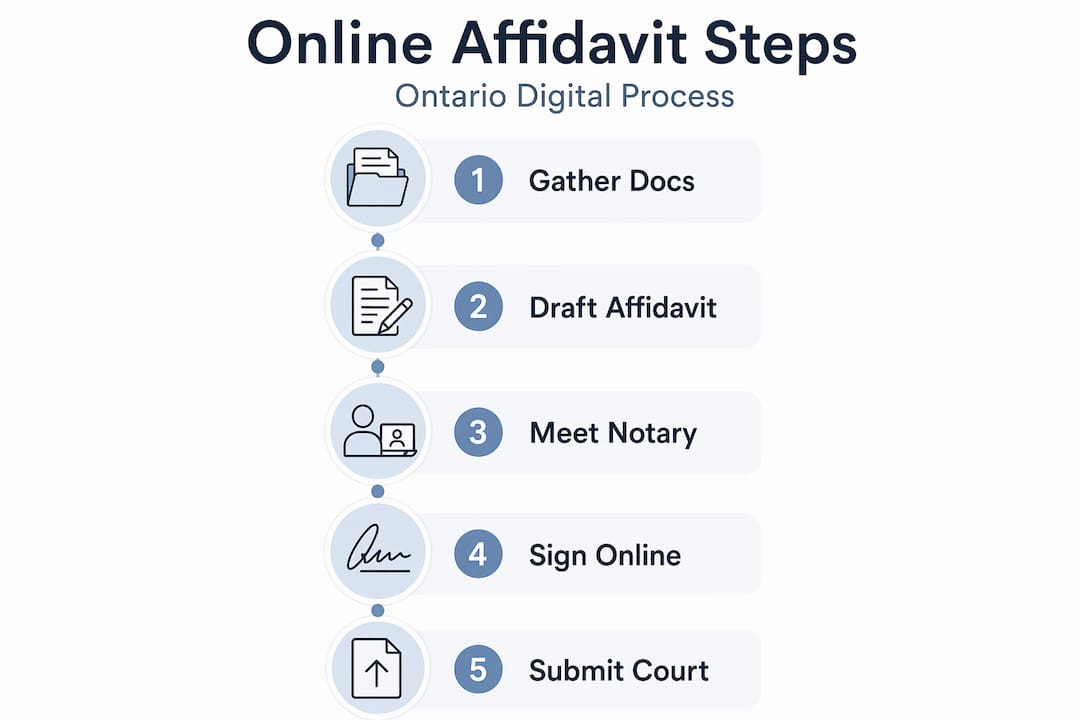

Drafting the document is only half the work. Making it legally valid requires a properly authorized witness. In Ontario, that means either a commissioner for taking oaths or a notary public.
The role of commissioners and notaries
Commissioners for taking oaths are authorized to witness affidavits for use in Ontario. Notaries public have broader authority and can certify documents for use in other provinces or internationally. For most personal or court affidavits in Ontario, either will do. Your choice depends on where the affidavit will be used, not convenience alone.
How remote online notarization works
Remote online notarization (RON) lets you complete the entire signing process over a secure video call. Remote notarization uses identity verification technology such as knowledge-based authentication and credential analysis to confirm who you are before the session begins. Here is what to expect:
- You upload your ID documents before the appointment
- The platform verifies your identity using anti-fraud checks
- You join a live video call with the commissioner or notary
- You sign the document electronically in real time, in their presence
- They apply their electronic seal and signature
Fees for notarization typically range from about $10 to $30 per notarial act, with some platforms charging an additional technology fee. You can learn more about online commissioning in Ontario to understand what the process looks like in practice.
| Factor | In-person notarization | Remote online notarization |
|---|---|---|
| Convenience | Requires travel and scheduling | Available from home, often same day |
| Cost | Varies by location and notary | $10 to $30 plus possible tech fee |
| Legal validity in Ontario | Fully accepted | Fully accepted |
| ID verification | Physical documents shown | Digital credential analysis |
| Turnaround | Depends on availability | Often within hours |
Pro Tip: Always verify that the online notary or commissioner you hire is licensed in Ontario. A seal from an out-of-province or unregistered notary will not satisfy Ontario court requirements.
Filing and submitting your affidavit
Once commissioned, you are ready to file. Ontario courts accept affidavits by email or mail, and many proceedings can conclude without a hearing if the documents are complete and compliant.
A few things to keep in mind when filing:
- Confirm the exact submission method required by your specific court or institution. Email, mail, and in-person filing rules vary by court location and matter type.
- If you need to serve a copy on another party, that copy must be commissioned identically to the filed copy. Do not serve an unsigned or unsworn photocopy.
- After service, you may need to file an affidavit of service confirming when, where, and how you served the other party.
- Follow up with the court to confirm receipt and acceptance. Courts are busy, and submissions can get missed.
- Keep a digital and physical copy of every commissioned document. If a dispute arises, you will want a reliable record.
When your affidavit involves significant assets, contested facts, or any matter where the other party is represented by a lawyer, consult legal counsel before filing. An affidavit used in section 45 proceedings or similar specialized matters may require guidance from a registered agent or legal professional.
Common mistakes that get affidavits rejected
Most rejections come from the same handful of errors. Knowing them ahead of time saves significant frustration.
- Including hearsay. Writing “I was told that John signed the document” instead of “I witnessed John sign the document” is a classic error. If you did not see it yourself, it does not belong in the affidavit body.
- Signing before the appointment. This is one of the most common mistakes. The entire point of commissioning is that you sign in the presence of an authorized witness. A pre-signed affidavit is invalid.
- Using an outdated template. Ontario court forms are updated periodically. An affidavit template from three years ago may be missing required fields or formatted incorrectly for current requirements.
- Missing exhibit labels. Attachments without clear labels or references in the body text create confusion and can lead to rejection.
- Not confirming submission. Filing by email does not guarantee receipt. Always follow up.
- Mixing opinions with facts. Phrases like “I believe,” “I think,” or “it seems” introduce opinion language into what must be a purely factual document.
Pro Tip: Read your affidavit one final time and replace every passive or vague sentence with a direct, first-person factual statement. “The agreement was signed” becomes “I signed the agreement on March 4, 2026.” Specificity protects you.
My honest take on online affidavit preparation
I have seen a lot of affidavits come back rejected for reasons that were entirely preventable. What strikes me most is not the complexity of the legal requirements. Most of the rules are simple. The problem is that people rush.
They find an online affidavit template, fill it in quickly, sign it before the video call, and wonder why the court sends it back. Or they write a long paragraph that mixes what they personally witnessed with things a friend mentioned, not realizing that hearsay contaminates the entire statement.
My honest view is that remote notarization has made this process genuinely more accessible, especially for people in smaller Ontario communities who previously had to drive to a city just to find a commissioner. That convenience is real. But convenience does not replace accuracy.
What I have found to work consistently is combining digital tools with professional review before you book the notarization appointment. Even a 15-minute review from someone who knows Ontario court requirements can flag a paragraph that would otherwise get your document thrown out. The time investment is small. The value is real.
If your matter is straightforward, an Ontario affidavit guide tailored to your situation can get you most of the way there on your own. But if any part of the process feels uncertain, do not guess. Get it checked.
— Ken
Get your affidavit notarized by Ontario experts
If you have drafted your affidavit and need a trusted, licensed commissioner to make it legally valid, Theonlinenotary makes the entire process accessible from wherever you are in Ontario.

Theonlinenotary offers online notary services in Ontario around the clock, covering affidavits, statutory declarations, solemn declarations, and more. The platform handles identity verification, live video signing, and electronic sealing in a single appointment, typically completed the same day. Whether you are dealing with a probate matter, a general affidavit, or need to understand the types of affidavits that apply to your situation, the team is ready to help you get it done correctly and without the back-and-forth that comes with courthouse visits.
FAQ
What is an online affidavit?
An online affidavit is a sworn written statement prepared digitally and commissioned via remote video with a licensed notary or commissioner. It carries the same legal weight as an affidavit prepared in person, provided it meets Ontario’s legal requirements.
How do I file an affidavit online in Ontario?
Most Ontario courts accept affidavits submitted by email or mail, without requiring a hearing unless an objection arises. Always confirm the specific submission method with the receiving court or institution and follow up to verify acceptance.
Can I sign an affidavit before meeting the notary?
No. You must sign the affidavit in the presence of an authorized commissioner or notary, whether in person or via live video. A pre-signed affidavit is legally invalid and will be rejected.
What is the difference between a commissioner and a notary public in Ontario?
A commissioner for taking oaths can witness affidavits for use within Ontario. A notary public has broader authority and can certify documents for use in other jurisdictions, including internationally. For most Ontario court filings, either is sufficient.
How much does online notarization cost in Ontario?
Remote notarization typically costs between $10 and $30 per notarial act, with some platforms adding a technology fee. Rates vary by provider, so confirm pricing before booking your appointment.





