
TL;DR:
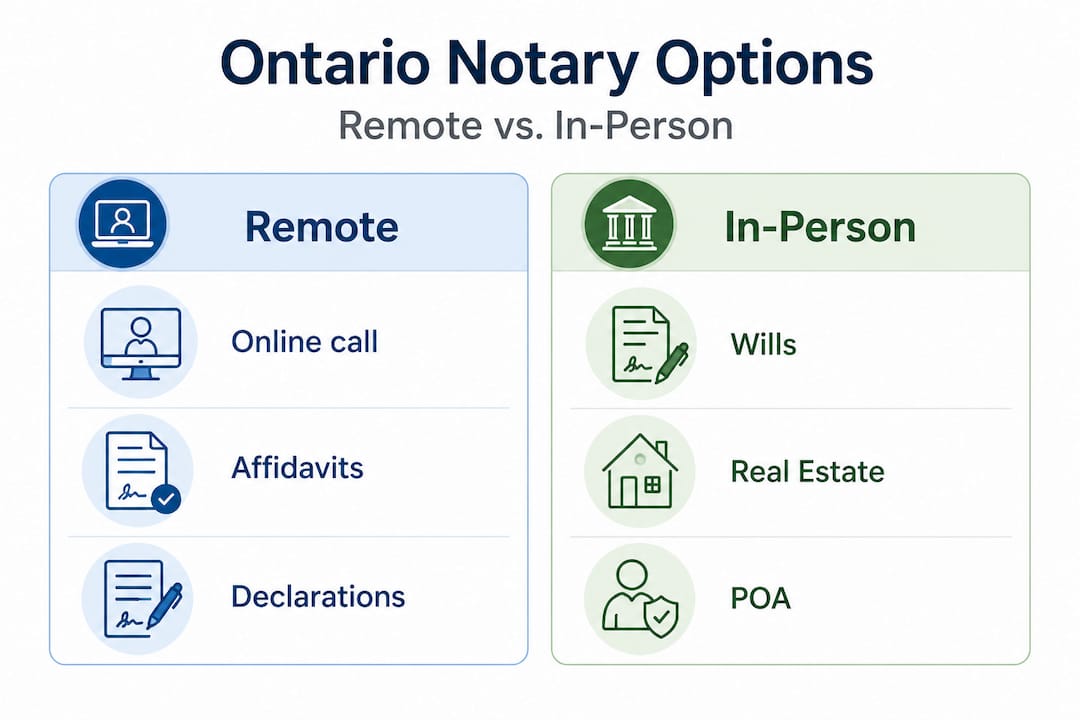
- Only affidavits, statutory declarations, and solemn declarations can be remotely commissioned in Ontario.
- Legitimate online services must be licensed by the Law Society of Ontario and follow specific legal guidelines.
- In-person notarizations are required for wills, powers of attorney, and real estate documents.
Most Ontarians searching for a “public notary near me” online end up more confused than when they started. The ads promise fast, legal, fully online notary services, but the reality is far more nuanced. Ontario has specific rules about what can and cannot be done remotely, and using the wrong service can leave your document invalid, rejected by a government agency, or worse, legally unenforceable. This guide cuts through the noise and gives you a clear, accurate picture of what online commissioning actually covers, how to find a legitimate provider, and how to get your document done right the first time.
Table of Contents
- What “public notary near me” really means in Ontario
- Remote commissioning in Ontario: What’s legal and what’s not
- How to verify a legitimate online commissioning service
- Step-by-step: Booking and completing your online commissioned document
- Why focusing on Ontario-specific online commissioning protects you
- Get started with a trusted Ontario online notary platform
- Frequently asked questions
Key Takeaways
| Point | Details |
|---|---|
| Remote commissioning explained | You can commission affidavits and statutory declarations online in Ontario, but not notarize all documents. |
| Always verify licensing | Use only Ontario-licensed commissioners to avoid document rejection or legal issues. |
| Not all documents are eligible | Wills, powers of attorney, and real estate documents require in-person notarization. |
| Choose Ontario platforms | Ontario-focused online services ensure legal compliance and faster turnaround. |
What “public notary near me” really means in Ontario
With so much confusion in terminology, let’s clarify what actually counts as a public notary service near you, especially online.
The terms “public notary,” “notary public,” and “commissioner for affidavits” are not interchangeable, even though most people use them that way. In Ontario, a notary public is a lawyer or other authorized individual who can certify documents, administer oaths, and perform a range of formal legal acts. A commissioner for affidavits is a more limited role, typically held by lawyers, paralegals, or other designated individuals, focused on witnessing oaths and declarations. The phrase “public notary” is not actually a recognized legal title in Ontario at all. It is a popular search term that blends these two distinct roles together.
Why does this matter? Because the services each role can provide online are completely different.
Remote commissioning of affidavits and statutory declarations is legally permitted in Ontario under Ontario Regulation 431/20, administered by commissioners for taking affidavits, often lawyers or paralegals licensed by the Law Society of Ontario. However, full online notary services under the Notaries Act are not permitted remotely. Only remote commissioning for oaths, affidavits, and declarations is allowed.
Here is a quick comparison to make this concrete:
| Document type | Can it be done online? | Who handles it? |
|---|---|---|
| Affidavit | Yes (remote commissioning) | Commissioner for affidavits |
| Statutory declaration | Yes (remote commissioning) | Commissioner for affidavits |
| Solemn declaration | Yes (remote commissioning) | Commissioner for affidavits |
| Will | No | Notary public (in-person only) |
| Power of attorney | No | Notary public (in-person only) |
| Certified true copy | No | Notary public (in-person only) |
| Real estate documents | No | Notary public (in-person only) |
Understanding the online notary legalities in Ontario before booking is one of the most important steps you can take. Many people book an appointment, show up online, and discover the document they need falls outside what remote commissioning allows.
Common mistakes when searching for a notary online include:
- Assuming any service advertising “online notary” is legally authorized for all document types
- Not checking whether the provider is licensed by the Law Society of Ontario
- Choosing a national platform without verifying Ontario-specific compliance
- Confusing American “remote online notarization” rules with Ontario law, which is entirely different
“The terminology around online notary services in Ontario is genuinely confusing, and that confusion creates real legal risk. The safest approach is to confirm the exact document type you need before booking anything.”
Exploring online notary service options specific to Ontario helps you avoid wasting time and money on services that cannot legally handle your document.
Remote commissioning in Ontario: What’s legal and what’s not
Now that you know the correct role of a public notary versus a commissioner, it’s crucial to see the clear line between what is permitted online and what isn’t.
Remote commissioning of affidavits and statutory declarations is legally permitted in Ontario under Ontario Regulation 431/20. This regulation was introduced during the COVID-19 pandemic and has since been maintained as a permanent option for Ontarians who need accessible legal document services.
Here is exactly how remote commissioning works under the regulation:
- Real-time audio-visual connection. The entire session must happen over a live video call. Pre-recorded video is not acceptable.
- Government-issued photo ID. You must show valid photo identification on camera. The commissioner must be able to clearly see and verify your ID.
- Modified jurat language. The jurat (the formal statement at the bottom of the document) must include specific language noting that the process was conducted remotely and recording the locations of both parties.
- Commissioner precautions. The commissioner must take reasonable steps to ensure there is no interference or coercion during the session.
- Transaction record. A record of the remote commissioning session must be kept.
What can be done online using this process:
- Affidavits (financial, general, immigration-related)
- Statutory declarations
- Solemn declarations
- Oaths and affirmations
- Invitation letters requiring a sworn statement
What cannot be done online under current Ontario law includes wills, powers of attorney, certified true copies, and real estate documents. These require in-person attendance with a notary public. This is a firm legal boundary, not a preference.
A common and costly mistake is trying to get a will or a power of attorney commissioned online. Any document completed this way will be legally invalid and rejected by the courts, financial institutions, or government agencies that receive it. The time and money spent on that appointment are simply lost.

| Process step | Remote commissioning | In-person notarization |
|---|---|---|
| Location | Anywhere in Ontario | Must attend in person |
| Technology required | Video-capable device | None |
| ID verification | On camera | Physical inspection |
| Documents eligible | Affidavits, declarations | All document types |
| Jurat language | Modified (remote notation) | Standard |
Pro Tip: Before booking any appointment, confirm the exact document type with the receiving organization (such as a court, employer, or government office) to ensure they will accept a remotely commissioned version. Some institutions have their own requirements that go beyond Ontario’s baseline rules.
Learning how to verify an online notary before your appointment protects you from wasted time. You can also read more about affidavit commissioning online to understand exactly what the process looks like for one of the most common document types.
How to verify a legitimate online commissioning service
After understanding what can and cannot be done online, the next challenge is protecting yourself from services that bend or break the rules.
The Law Society of Ontario has flagged a growing concern: many services market themselves as “online notary” providers but are either operating outside their legal scope or are not licensed at all. Using one of these services means your document could be completely invalid, even if it looks official.
Here is how to protect yourself:
- Check LSO licensing. Every legitimate commissioner for affidavits in Ontario must be licensed by the Law Society of Ontario. You can search the LSO’s public directory at lso.ca to confirm any individual’s license status.
- Look for a named commissioner. A trustworthy service will clearly identify the specific licensed individual who will be administering your oath. Anonymous “notary services” with no named professional are a red flag.
- Verify an Ontario address. The service should have a verifiable Ontario presence. National or international platforms may not be current on Ontario-specific regulations.
- Read the privacy policy. A legitimate service will have a clear, detailed privacy policy explaining how your personal information and ID are handled and stored.
- Confirm the jurat language. Ask the provider in advance whether their completed documents include the modified jurat required under Ontario Regulation 431/20. If they don’t know what that means, walk away.
Warning signs that a service may not be legitimate:
- No identifiable commissioner name listed anywhere on the website
- Prices that seem unusually low with no explanation of the process
- Claims to notarize wills, powers of attorney, or real estate documents online
- No Ontario-specific regulatory information on the site
- Pressure to complete the process without a live video call
The Ontario notary verification process is straightforward once you know what to look for. You can also use a simple checklist approach when evaluating any provider. If they pass all five checks above, you are likely in good hands. If they fail even one, keep looking.
Knowing how to verify a notary in Ontario is a skill that protects both your time and your legal standing. A rejected document means starting over, often with a deadline looming.
Step-by-step: Booking and completing your online commissioned document
Once you’ve picked a trusted, legally-compliant service, here is how the process actually works from start to finish.
The key mechanics of remote commissioning under Ontario Regulation 431/20 involve a real-time audio-visual video call, identity verification via government-issued photo ID shown on camera, a modified jurat noting the remote process and the locations of both parties, and a record of the transaction being kept by the commissioner.
Here is what you need to prepare before your appointment:
- A government-issued photo ID (passport, driver’s license, or Ontario photo card)
- A device with a working camera and microphone (laptop, tablet, or smartphone)
- A stable internet connection
- The document you need commissioned, either printed and ready to sign or in digital format depending on the service’s process
- Any supporting materials the receiving organization has specified
The step-by-step process looks like this:
- Book your appointment online. Most Ontario-compliant platforms offer scheduling through their website with same-day or next-day availability.
- Receive the document preparation instructions. The service will tell you whether to print the document, leave it unsigned, or upload a digital version.
- Join the video call at your scheduled time. Use a quiet, well-lit space where your face and ID are clearly visible.
- Present your government-issued photo ID on camera. The commissioner will verify your identity before proceeding.
- Read and sign the document. You will be guided through the oath or declaration and asked to sign in view of the commissioner.
- Receive your completed document. The commissioner adds the modified jurat, signs, and seals the document. You receive a completed copy, typically by secure email or digital download.
- Check the jurat. Confirm the document includes the remote commissioning notation and the commissioner’s name, license information, and signature.
Tips for a smooth experience:
- Test your camera and microphone at least 15 minutes before the call
- Have your ID physically in hand before joining, not across the room
- Use a plain, uncluttered background to make ID verification easier
- If the document is long, read it fully before the appointment so you can sign confidently
For more detail on preparing for this process, the guide on steps for online affidavit commissioning walks through each stage with practical tips for first-time users.
Why focusing on Ontario-specific online commissioning protects you
With the steps in hand, it’s worth reflecting on why choosing the right kind of online commissioning service can make all the difference.
Here is the uncomfortable truth: not every service calling itself an “online notary” in Ontario actually follows Ontario’s rules. National platforms built for multiple provinces sometimes apply rules from other jurisdictions, or they lag behind Ontario-specific regulatory updates. When your document gets rejected because the jurat language doesn’t match Ontario Regulation 431/20’s requirements, the platform that issued it won’t be the one explaining the situation to your employer, immigration officer, or the court.
We have seen this pattern repeatedly. Someone uses a well-known national service, pays for the session, receives a document that looks perfectly official, and then gets a rejection notice weeks later. At that point, they have to start the entire process again, often under time pressure and sometimes with financial consequences.
Ontario-focused platforms are simply better positioned for compliance and speed. They track changes to Ontario Regulation 431/20, they know which document types are and aren’t permitted remotely, and their commissioners are licensed specifically under Ontario law. That specificity is not a small detail. It is the difference between a valid document and a wasted appointment.
Ontario’s legal framework for remote commissioning is also not static. Regulations can be updated, and a service that was compliant last year may not have kept pace. Ontario-specific providers have a direct stake in staying current because their entire business depends on it. National or international services do not have the same incentive.
The Ontario notary realities are worth understanding deeply before you commit to any provider. Choosing a service that specializes in Ontario is not just a preference. It is a practical strategy for protecting your document’s legal standing.
Get started with a trusted Ontario online notary platform
If you’re ready to proceed with confidence, here’s how you can take the next step and avoid common pitfalls.
Navigating Ontario’s online commissioning rules on your own takes time and research. A specialized Ontario platform removes that burden entirely by handling compliance, scheduling, and document delivery in one streamlined process.

Our Notary Online Ontario services cover affidavits, statutory declarations, solemn declarations, invitation letters, and more, all completed through legally compliant remote commissioning sessions with licensed commissioners. Every document we issue meets Ontario Regulation 431/20 requirements, including the modified jurat language that receiving institutions require. Before booking, you can review the Ontario public notary requirements to confirm your document type is eligible. Same-day appointments are often available, and your completed document is delivered securely and quickly.
Frequently asked questions
Can I notarize a document online in Ontario?
You can only remotely commission affidavits, oaths, and statutory declarations online. Full online notary services under the Notaries Act are not permitted remotely in Ontario.
What documents require in-person notarization in Ontario?
Wills, powers of attorney, certified true copies, and real estate documents must be handled in person. These document types fall outside the scope of remote commissioning under Ontario law.
How does remote commissioning work for affidavits and declarations?
Remote commissioning uses a real-time audio-visual video call to verify your identity and witness your signature, followed by a modified jurat notation on your document confirming the remote process.
How do I check if an online notary or commissioner is legitimate in Ontario?
Always confirm the provider is licensed by the LSO and is clearly identified as a commissioner for affidavits with a verifiable Ontario presence.





