
TL;DR:
- Ontario law distinguishes between remote commissioning for affidavits and full notarization requiring in-person presence.
- Online commissioning is limited to affidavits and declarations, not including property or legal documents.
- Proper compliance involves verifying document eligibility, authorized professionals, real-time ID verification, and recipient acceptance.
Plenty of Ontarians assume that if something can be done online, notarization is no exception. That assumption causes real problems. Ontario law draws a sharp line between remote commissioning (administering oaths and affirmations via video) and notarization (a broader set of acts requiring physical presence for most document types). Getting this wrong means rejected documents, missed deadlines, and frustrated institutions. This guide walks you through exactly what online notary and commissioning services can and cannot do in Ontario, what the regulations actually say, and how to protect your documents from the start.
Table of Contents
- Legal foundations of online notary and commissioning in Ontario
- Key differences: Remote commissioning vs traditional notarization
- Compliance steps for using online commissioning services
- Common mistakes and how to avoid invalid documents
- The bigger picture: What most guides miss about online notary legalities
- Get help with your online notary and commissioning needs
- Frequently asked questions
Key Takeaways
| Point | Details |
|---|---|
| Remote commissioning legal | Ontario allows remote commissioning for certain documents if precise procedures are followed. |
| Traditional notarization required | Most notarizations still require in-person presence except for specified exceptions. |
| Verify document acceptance | Always confirm with the document recipient and use authorized professionals to prevent rejection. |
| Avoid common mistakes | Stick to provincial rules and check document eligibility to avoid costly errors. |
Legal foundations of online notary and commissioning in Ontario
Before anything else, it helps to understand that Ontario law recognizes two distinct roles. A Notary Public holds broader authority, including certifying copies, authenticating signatures, and preparing certain legal instruments. A Commissioner for Taking Affidavits has a narrower role: administering oaths and affirmations for affidavits and statutory declarations. Most people who need online services actually need a commissioner, not a notary.
The regulation that changed everything for remote services is O. Reg. 431/20, which came into force during the pandemic and was later made permanent. It specifically allows commissioners to administer oaths and affirmations remotely using audio-visual technology. Remote online commissioning is legal in Ontario under this regulation, but it does not extend to full notarization. That distinction is critical.
Here are the key legal facts every Ontario resident and business should know:
- Remote commissioning is permitted for affidavits, statutory declarations, and solemn declarations
- The commissioner and deponent (the person swearing) must be on a live, real-time audio-visual call
- The commissioner must verify the deponent’s identity using government-issued photo ID
- A modified jurat (the certification wording at the bottom of the document) is required to note the remote process
- Full notarization, such as certifying true copies or authenticating documents for international use, still requires physical presence in most cases
- Authorized commissioners include lawyers, paralegals licensed by the Law Society of Ontario (LSO), and certain public officials
If you want to understand whether your specific situation qualifies, reviewing is online notarization legal in Ontario gives a clear breakdown of current rules. You can also learn more about how to notarize documents remotely and what the process looks like in practice.
“O. Reg. 431/20 permits commissioners to administer oaths and affirmations remotely, but this authority does not extend to the full range of notarial acts under the Notaries Act.”
Pro Tip: Before booking any online session, call or email the institution receiving your document and ask explicitly whether they accept remotely commissioned documents. Some government agencies and banks have internal policies that go beyond what the law requires.
Understanding online notary requirements at the outset saves you from completing a process that your recipient will not honor.
Key differences: Remote commissioning vs traditional notarization
Once the framework is clear, it is essential to separate what you can do online from what still demands an in-person visit. Many users conflate the two, especially after seeing U.S.-based services advertising fully remote notarization. Ontario is different.

Full remote notarization is not permitted in Ontario; physical presence is still required for most notarizations. This includes certifying true copies of original documents, notarizing real estate documents, and preparing powers of attorney in most circumstances.
| Feature | Remote commissioning | Traditional notarization |
|---|---|---|
| Regulatory authority | O. Reg. 431/20 | Notaries Act (Ontario) |
| Allowed documents | Affidavits, statutory declarations | Certified copies, property docs, powers of attorney |
| Physical presence required | No | Yes |
| Video call required | Yes | No |
| Modified jurat needed | Yes | No |
| Who can perform it | Lawyers, LSO paralegals, certain officials | Notaries Public |
Knowing how online notary process works helps you choose the right service from the start.
Here is a numbered checklist to determine which service you actually need:
- Identify your document type. Is it an affidavit or statutory declaration? Remote commissioning likely applies.
- Check who is receiving it. Does the recipient accept remotely commissioned documents?
- Confirm the purpose. If it involves real estate, international authentication, or certified copies, you likely need in-person notarization.
- Verify the commissioner’s credentials. Are they an LSO-licensed lawyer or paralegal?
- Confirm the platform. Is the video conferencing tool secure and compliant with the regulation’s technical requirements?
“The LSO has confirmed that while remote commissioning is lawful under O. Reg. 431/20, most notarial acts under the Notaries Act still require the physical presence of all parties.”
This distinction protects document integrity. It also means that if someone tells you they can notarize any document remotely in Ontario, that claim is not accurate under current law.
Compliance steps for using online commissioning services
Understanding the rules is one thing. Following them correctly is another. Here is a practical, step-by-step guide to completing a remote commissioning session that will hold up to scrutiny.
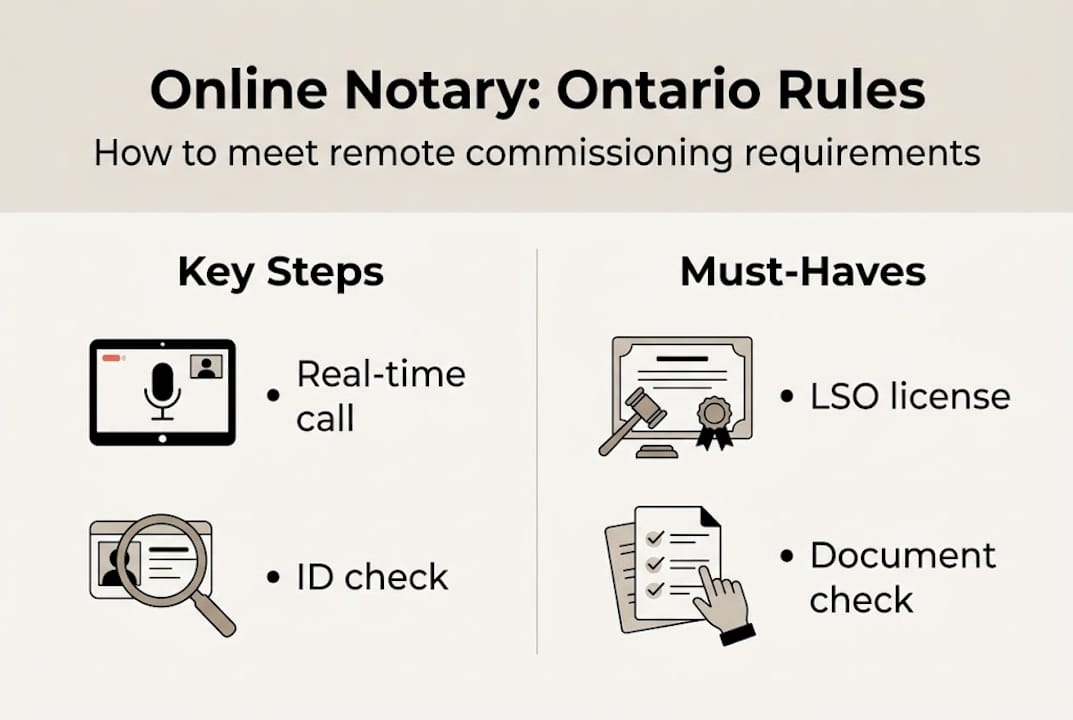
Steps for a compliant remote commissioning session:
- Book with an authorized commissioner. Confirm they are an LSO-licensed lawyer or paralegal.
- Prepare your document in advance. The document should be complete except for the signature and jurat.
- Gather two pieces of government-issued ID. At least one must include your photo.
- Join the video call from a secure, private location. Both parties must be visible and audible throughout.
- Present your ID on camera. The commissioner must verify your identity in real time.
- Sign the document while on camera. Do not pre-sign.
- Confirm the modified jurat is included. It must note that the oath was administered remotely under O. Reg. 431/20.
- Retain records. Both parties should keep copies of the session details for at least one year.
As O. Reg. 431/20 requirements specify, the commissioner and deponent must communicate in real time, confirm ID, and include a special notation in the jurat.
| Requirement | Details |
|---|---|
| Acceptable ID | Passport, driver’s license, permanent resident card |
| Platform security | Encrypted, real-time audio-visual connection |
| Record retention | Minimum 1 year recommended |
| Modified jurat | Must reference remote process and regulation |
| Commissioner authority | LSO-licensed lawyer or paralegal |
For a full walkthrough, the online notarization instructions page covers each step with specific examples.
Pro Tip: Ask your commissioner to send you a written confirmation of their LSO license number before the session. A legitimate commissioner will not hesitate. This one step protects you if the document is ever challenged.
Common mistakes and how to avoid invalid documents
Making it practical, here are the pitfalls most users encounter and how to preempt them before they cost you time and money.
Most frequent mistakes with online commissioning:
- Using the wrong official. Booking a commissioner for a document that legally requires a Notary Public, or vice versa.
- Document type not eligible. Attempting to remotely commission certified true copies or real estate documents.
- Missing the modified jurat. Submitting a document without the required notation that the oath was administered remotely.
- Failing to verify recipient acceptance. Assuming the receiving institution will accept a remotely commissioned document without checking first.
- Pre-signing the document. Signing before the video session begins invalidates the entire process.
- Using an unsecured platform. Conducting the session over a non-encrypted video tool that does not meet regulatory standards.
Industry practitioners report that missing or incorrect jurat wording is among the most common reasons remotely commissioned documents are rejected by government agencies and courts. A single line of missing text can send you back to square one.
Always confirm the document’s eligibility and recipient acceptance before using online commissioning. This is not optional due diligence. It is the difference between a valid document and a wasted session.
The online notarization process guide outlines how to check eligibility for specific document types before you book.
Pro Tip: Create a short checklist before every remote commissioning session: eligible document type, authorized commissioner confirmed, recipient acceptance verified, ID ready, platform secure. Five checks, five minutes, zero surprises.
Avoid the trap of assuming that because a service is offered online, it automatically complies with Ontario law. Verify the online commissioning rules apply to your specific situation every single time.
The bigger picture: What most guides miss about online notary legalities
Here is something worth saying plainly: Ontario’s strict separation between remote commissioning and in-person notarization is not bureaucratic stubbornness. It is deliberate protection.
Many users come to us frustrated after expecting U.S.-style fully remote notarization. In several American states, any document can be notarized online. Ontario has not gone that route, and for good reason. The Notaries Act protections exist because certain documents carry enormous legal weight. Property transfers, powers of attorney, and international authentications can affect someone’s assets, rights, and identity for decades. Loosening those standards without robust safeguards would create fraud risks that outweigh the convenience gained.
What we have seen in practice is that the hybrid model works well for the documents that make up the majority of everyday needs: affidavits for immigration, statutory declarations for insurance claims, solemn declarations for government applications. For those, online notary accessibility has genuinely improved people’s lives, especially for those in remote areas or with mobility challenges.
The real risk is not the regulation. It is users who skip due diligence because the process feels informal on a video call. The legal weight of a commissioned document does not change because it was done remotely. Treat it with the same seriousness you would an in-person appointment.
Get help with your online notary and commissioning needs
If you are ready to take the next step with full confidence, here is how to do it safely and simply.
Navigating Ontario’s online notary rules does not have to be stressful. Whether you need an affidavit commissioned for an immigration application, a statutory declaration for a financial institution, or a solemn declaration for a government body, working with authorized professionals makes the difference between a document that gets accepted and one that gets sent back.

Our trusted online notary services connect you with LSO-licensed commissioners who follow every requirement under O. Reg. 431/20. Not sure which service applies to your document? Browse our guide to document notarization types to find the right fit before you book. We handle affidavits, invitation letters, statutory declarations, solemn declarations, and more, all with full compliance and clear communication throughout.
Frequently asked questions
Is online notary service fully legal in Ontario in 2026?
Online commissioning is legal for affidavits and statutory declarations, but full online notarization still requires in-person presence for most document types under the Notaries Act.
What documents can I commission online in Ontario?
Affidavits, statutory declarations, and solemn declarations are eligible for remote commissioning with an authorized LSO-licensed commissioner in Ontario.
What do I need to prepare for an online commissioning session?
You need government-issued photo ID, a device with a stable video connection, and confirmation that your document type is eligible. ID and real-time presence are mandatory under the regulation.
Can I notarize real estate or power of attorney documents online?
Most property transfers and powers of attorney still require in-person notarization. Full remote notarization is not permitted for these document types under current Ontario law.
How do I ensure my commissioned document is accepted?
Always confirm with the receiving institution before your session, and verify both authority and recipient acceptance. Use only LSO-licensed commissioners for full legal protection.
Recommended
- How to Notarize Documents Online in Ontario: Fast & Secure Guide to Online Notary Services (2025) – The Online Notary
- Digital Notary Security: Legal Compliance in Ontario – The Online Notary
- Online Notary in Ontario: Fast, Legal, and Secure Services 2025 – The Online Notary
- Secure Document Management | Xpath Pro for HRs





