TL;DR:
- Ontario’s legal framework now fully supports remote notarization, enabling faster, more flexible corporate documentation processes. Digital notaries verify identities in real-time via live audio-visual sessions, ensuring compliance with Ontario regulations and improving efficiency across legal, HR, and finance workflows. Choosing compliant providers with robust audit trails and scalability is essential for avoiding legal risks and streamlining high-volume notarizations.
Corporate executives in Ontario have long assumed that getting documents notarized means blocking off an afternoon, arranging travel for multiple stakeholders, and waiting days for paperwork to catch up with decisions already made. That assumption is now outdated. Ontario’s regulatory framework actively supports remote notarization through live audio-visual communication, meaning your legal documents can move as fast as your business decisions. This guide breaks down what digital notary services mean for corporations, how to stay fully compliant, and how to build document workflows that actually support executive productivity rather than slow it down.
Table of Contents
- What is a digital notary for corporations?
- Ontario’s regulations for remote corporate notarization
- Benefits and pitfalls of digital notary for corporate workflows
- Choosing the right digital notary partner for your corporation
- A closer look: Why digital notary for corporations will soon be the default
- Start streamlining your corporate documentation today
- Frequently asked questions
Key Takeaways
| Point | Details |
|---|---|
| Fully legal in Ontario | Remote digital notary is authorized for corporations if O. Reg. 431/20 criteria are satisfied. |
| Compliance is critical | Identity, real-time communication, modified jurat, and record retention are essential for valid documents. |
| Efficiency gains | Digital notarization saves time and resources across multi-party corporate transactions. |
| Provider vetting needed | Choose partners with proven compliance and secure digital processes designed for organizations. |
What is a digital notary for corporations?
To understand how this innovation changes the game, let’s define exactly what digital notary means for corporations.
A digital notary is a commissioned or licensed notary public who administers oaths, affirmations, and statutory declarations using secure, real-time audio-visual technology rather than requiring all parties to be physically present in the same room. For corporations, this matters enormously. Think about how often your legal, HR, and operations teams need signatures witnessed on affidavits, board resolutions, statutory declarations, or cross-border contracts. Each one of those touchpoints has traditionally required someone to physically attend a notary’s office.
Understanding the full digital notary meaning for Ontario corporations also means recognizing how it differs from a simple e-signature. A digital notary is not just a signature placed on a PDF. It involves live identity verification, real-time communication, formal witnessing, and a modified jurat that documents the remote method used.
Common problems with traditional corporate notarization:
- Scheduling conflicts across multiple executives and witnesses in different cities
- Delays in document execution that hold up financing, compliance filings, or vendor agreements
- Physical paper handling that creates version control problems and security risks
- High per-document costs when executives must travel or notaries make office visits
- Poor audit trails when paper-based processes are reconstructed after the fact
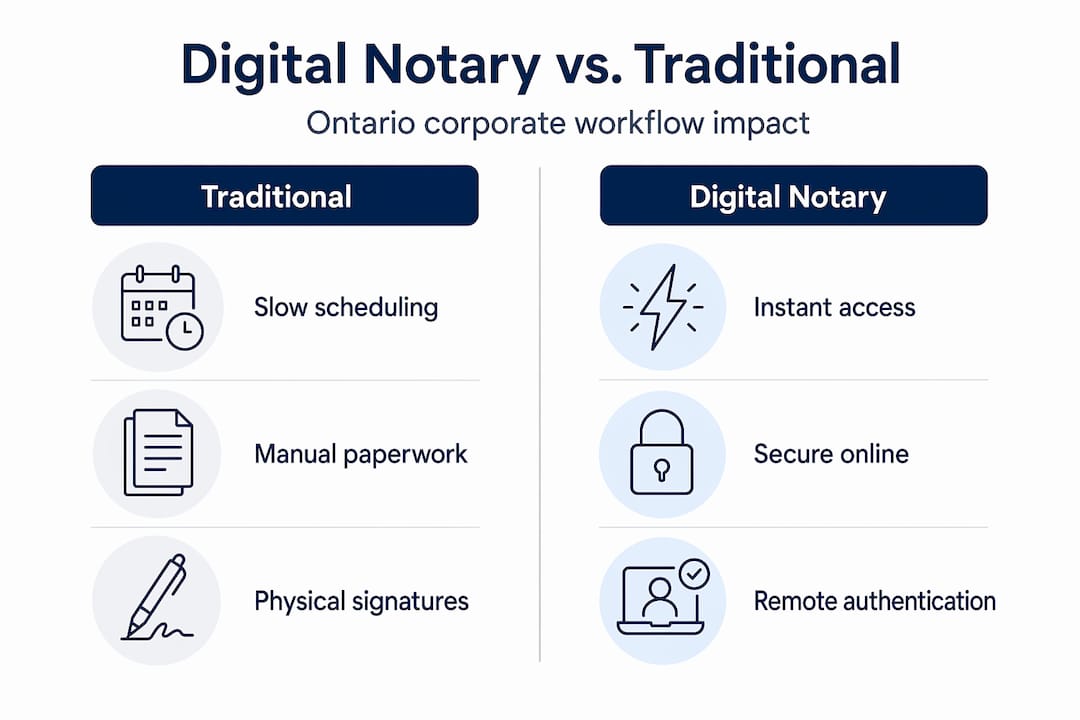
Ontario law enables a better path. Remote notarization legality in Ontario is grounded in O. Reg. 431/20, which has been in force since August 2020. Under this regulation, Ontario allows remote administration of oaths, affirmations, and declarations through real-time audio-visual communication when specific conditions are met. That is not a workaround or a gray area. It is the law, and it makes digital notarization a fully legitimate and enforceable option for Ontario corporations.
| Factor | Traditional in-person notarization | Digital notary |
|---|---|---|
| Time to schedule | 1 to 5 business days | Same day or next day |
| Geographic flexibility | Limited to local notary | Province-wide, anywhere with internet |
| Audit trail quality | Paper-based, manual | Digital, timestamped, encrypted |
| Scalability for volume | Low, bottlenecks at peak times | High, concurrent sessions possible |
| Legal compliance in Ontario | Established | Fully enabled under O. Reg. 431/20 |
| Cost per document | Higher (travel, printing, storage) | Lower and more predictable |
The scalability difference is especially important for corporate teams managing multiple transactions simultaneously. A company closing several vendor agreements in the same week simply cannot rely on in-person notarization for each one without creating serious operational drag.
Ontario’s regulations for remote corporate notarization
With the basics in place, it’s crucial to understand the legal specifics that ensure your remote notarization process is bulletproof under Ontario law.
O. Reg. 431/20 sets out a precise set of requirements, and understanding each one protects your organization from the risk of having documents challenged or rejected during a regulatory audit, litigation, or cross-border transaction review. Following digital notary best practices is not just about convenience. It is about making sure every document you execute remotely will hold up under scrutiny.
Step-by-step compliance checklist for remote notarization in Ontario:
- Confirm document type. First, determine whether your document requires “notarization by a notary public” or “commissioning” (typically for oaths or statutory declarations). The distinction affects which professional you need and what procedural rules apply.
- Establish a real-time audio-visual connection. The session must be live. Pre-recorded video is not acceptable. Both parties must be able to see and hear each other clearly throughout the entire session.
- Verify identity before the session begins. The notary or commissioner must confirm the signer’s identity using approved methods. Government-issued photo ID is the standard, and live identity verification tools add a robust, auditable layer to this step.
- Conduct the full oath or declaration ceremony. The notary administers the oath or takes the declaration exactly as they would in person. This step cannot be abbreviated or skipped.
- Use a modified jurat. The notary’s certification on the document must state that the process was conducted remotely, including the method used and the locations of both the signer and the notary at the time of execution.
- Retain complete transaction records. O. Reg. 431/20 requires that records of the remote session be kept. Your provider must retain these records, and your organization should keep its own copies.
“Edge-case checklist for compliance: confirm whether the document requires ‘notarization by a notary public’ vs ‘commissioning’ (oaths/statutory declarations). If it’s the latter, ensure the provider uses real-time audio-visual communication, performs live identity confirmation, uses a modified jurat stating remote method/location, and retains transaction records per O. Reg. 431/20.”
Your compliance posture matters not just for today’s transaction but for every future audit. When a regulator, lender, or opposing counsel asks for proof that a document was properly executed, you want a complete, timestamped digital record rather than a paper trail that someone needs to reconstruct from memory.
Pro Tip: Assign one person on your legal or administrative team to maintain a digital notarization log for every remote execution. Record the document type, the provider used, the date, and the record retention reference number. This takes five minutes per transaction and can save hours during a compliance review.
Review your provider’s approach to security and compliance before you finalize any agreement. Encryption standards, data storage practices, and session recording protocols vary significantly between providers.
Benefits and pitfalls of digital notary for corporate workflows
Now that requirements are clear, let’s look at the tangible advantages digital notary services offer and how to sidestep common corporate missteps.
The efficiency gains from switching to digital notarization are not marginal. Corporations that have made the shift report measurable improvements in deal velocity, reduced administrative overhead, and better document consistency. The digital notary benefits extend across departments, from legal to HR to finance.
Where digital notarization creates the most value:
- Multi-signature approvals. Board resolutions and documents requiring multiple executives to swear or affirm can be scheduled in back-to-back remote sessions within a single day, rather than coordinating a room full of schedules over weeks.
- Cross-jurisdictional documents. When your executives are in Toronto, Calgary, and London simultaneously, digital notarization eliminates the geographic barrier entirely.
- High-volume statutory declarations. HR teams managing employment affidavits or procurement teams processing vendor declarations can batch-process documents through a single provider at a consistent standard.
- Time-sensitive compliance filings. Regulatory deadlines do not wait. Remote notarization means a document that must be filed by end of day can be executed that morning, not after a three-day scheduling delay.
| Factor | Traditional notarization | Digital notarization |
|---|---|---|
| Average turnaround time | 3 to 7 days | Same day to 24 hours |
| Cost per document | $50 to $150+ with travel | Lower, fixed pricing common |
| Audit trail | Manual, paper-based | Digital, encrypted, searchable |
| Executive time required | 45 to 90 minutes including travel | 10 to 20 minutes via video session |
| Scalability | One appointment at a time | Concurrent sessions, volume capacity |
However, digital notarization also comes with pitfalls that corporate teams need to anticipate.
Common mistakes to avoid:
- Using a provider that does not formally comply with O. Reg. 431/20. Not every platform offering “online document signing” is actually providing legally valid notarization. The reasons to choose digital notary solutions carefully are clear, but you must verify, not assume, compliance.
- Accepting vague or incomplete audit trails. If your provider cannot produce a full session log, identity verification record, and modified jurat on demand, that document’s enforceability is at risk.
- Failing to confirm document type before booking. Commissioning and notarization are distinct processes, and the wrong professional for the wrong document creates avoidable legal exposure.
- Overlooking record retention obligations. O. Reg. 431/20 requires that transaction records be retained. Both your provider and your organization carry responsibility here.
Pro Tip: Before executing any high-stakes document remotely, run a test session with your chosen provider using a low-stakes internal document. Confirm that every compliance element appears correctly in the final output, especially the modified jurat and the identity verification record.
Choosing the right digital notary partner for your corporation
Selecting the right notary partner is critical. Here’s how to confidently vet and onboard a digital notary solution for your corporation.

Not all providers are built for corporate use cases. Many platforms started by serving individuals with one-off documents and have not developed the infrastructure needed for high-volume, legally complex corporate requirements. Evaluating providers against clear criteria protects your organization from onboarding a solution that works in simple cases but fails when you need it most.
Step-by-step provider evaluation checklist:
- Confirm legal compliance. Ask directly whether the provider operates under O. Reg. 431/20. Request documentation. A compliant provider will answer this question immediately and thoroughly.
- Review identity verification protocols. How does the provider confirm signer identity? Look for multi-factor approaches that go beyond self-attestation.
- Assess audit trail quality. Request a sample completed document package. The jurat should clearly state the remote method and both parties’ locations. Session logs should be timestamped and searchable.
- Evaluate record retention practices. Where are records stored? For how long? Who has access? These are not minor administrative questions. They are risk management questions.
- Check service scalability. Can the provider handle your peak volumes? If you process fifty statutory declarations per quarter, you need a provider with documented capacity, not just a solo practitioner with a video call link.
- Request references from corporate clients. A provider experienced with individual users is not necessarily equipped for corporate legal documentation at scale.
Following established best practices during the vendor selection process ensures your organization doesn’t learn compliance lessons from a rejected document during a regulatory review.
Signs a provider is genuinely equipped for corporate use:
- Explicit, documented O. Reg. 431/20 compliance with written policies
- Corporate account management, not just individual booking
- Dedicated service levels with defined turnaround commitments
- Multi-document and batch processing capability
- Proactive communication about regulatory updates that may affect your documents
Red flags to watch for:
- Vague answers about the regulatory basis for their remote services
- No modified jurat in sample documents
- Inability to provide session logs or identity verification records on request
- Per-user pricing models that make corporate volume prohibitively expensive
A closer look: Why digital notary for corporations will soon be the default
Understanding the selection process is vital, but the deeper story here is strategic. Digital notarization is not a convenience feature. It is becoming a core competency for corporations that manage risk intelligently.
Consider the real cost of a delayed document. A financing agreement held up because one executive couldn’t get to a notary’s office in time is not a minor inconvenience. It can shift a deal’s closing timeline, trigger penalty clauses, or damage a commercial relationship that took years to build. Remote notarization eliminates this category of risk entirely, and that is worth far more than the per-document cost savings alone.
We’ve seen a pattern among legal operations professionals who adopted digital notarization early. They didn’t just save time. They restructured their documentation processes around the assumption of speed. That restructuring created compounding efficiency gains across every workflow that touched notarized documents. Counterintuitively, the companies most resistant to switching were often the ones with the most to gain, usually because they had large existing processes built around managing in-person scheduling and didn’t want to redesign those workflows. But “wait-and-see” in this context is itself a risk posture. Every month spent on legacy processes is a month of preventable delays, unnecessary costs, and documentation gaps that may only become visible during an audit or dispute.
Ontario’s legal framework around remote notarization evolution has been settled since 2020. Organizations that are still treating digital notarization as an experimental option are making a policy choice to accept operational friction that their competitors may not be accepting. The question is no longer whether digital notarization is legally valid in Ontario. It clearly is. The question is how quickly your organization builds the processes and selects the partners to make it part of standard operations.
Start streamlining your corporate documentation today
Having seen the road ahead, here’s how your organization can move forward with expert guidance and trusted resources.
Corporate documentation doesn’t need to be a bottleneck. If your team is still coordinating in-person notary appointments, managing paper-based audit trails, or waiting days for signatures on time-sensitive documents, you’re absorbing costs and risks that a compliant digital solution can eliminate.

Our trusted Ontario notary services are built specifically to handle the document types corporations need most, including affidavits, statutory declarations, solemn declarations, invitation letters, and more. Every session is conducted under O. Reg. 431/20, with full audit trails and compliant modified jurats included as standard. Before making a decision, explore our detailed notary solution comparison to see how purpose-built corporate notary services compare to general platforms. Your next document doesn’t need to wait until someone finds a parking spot near a notary’s office.
Frequently asked questions
Are digital notary signatures valid for corporate documents in Ontario?
Yes, as long as all requirements under O. Reg. 431/20 are met, including live audio-visual confirmation and proper identity verification, digital notary signatures carry full legal weight for Ontario corporate documents.
What types of corporate documents can be notarized remotely in Ontario?
Most corporate documents requiring notarization or commissioning, including affidavits, statutory declarations, and solemn declarations, can be completed digitally as long as remote requirements under O. Reg. 431/20 are fully satisfied.
What are the compliance essentials for digital notarization under Ontario law?
Real-time audio-visual interaction, live ID confirmation, a modified jurat stating the remote method and both parties’ locations, and proper transaction record-keeping are all required under the O. Reg. 431/20 compliance framework.
How can corporations ensure their digital notary provider is compliant?
Vet providers for explicit O. Reg. 431/20 compliance documentation, real-time audio-visual capability, modified jurats in their standard output, and audit-ready records. A compliant provider must confirm each of these O. Reg. 431/20 requirements in writing before you commit.