
TL;DR:
- Ontario businesses must ensure notary accessibility complies with AODA, remote verification laws, and online notarization requirements to avoid legal and operational risks. Providing tailored communication supports, documenting accommodation policies, and establishing recurring notary relationships help improve inclusivity and streamline processes. Proactive and integrated accessibility strategies enhance client trust, reduce delays, and future-proof compliance amid evolving digital notarization options.
Most Ontario business owners assume that finding a notary is straightforward until a deal stalls because a signer couldn’t physically attend, or a person with a disability needed communication support that nobody arranged. Notary accessibility for businesses is not just about location convenience. It touches on legal obligations under the Accessibility for Ontarians with Disabilities Act, service model choices, and the compliance risks that come from confusing three separate frameworks: AODA customer service rules, remote commissioning law, and online notarization requirements. Get these wrong and you face document failures, client complaints, and real legal exposure. This guide cuts through the confusion.
Key Takeaways
| Point | Details |
|---|---|
| AODA applies to your notary process | Ontario businesses with more than one employee must meet accessible customer service standards, including for notary-related interactions. |
| Three frameworks govern notary access | AODA, remote commissioning rules, and online notarization law are separate. Mixing them up creates compliance gaps. |
| Remote options have real legal limits | Remote commissioning requires live audiovisual verification; online notarization still requires physical presence under Ontario law. |
| Proactive scheduling reduces friction | Building recurring notary arrangements and advance accommodation protocols prevents last-minute bottlenecks. |
| Accessibility is a business differentiator | Organizations that treat notary access as a service quality issue, not just a legal checkbox, retain clients and close deals faster. |
Notary accessibility for businesses: what Ontario law actually requires
When people hear “notary accessibility,” they usually think of wheelchair ramps or accessible parking. That’s part of it, but it is far from the whole picture. Under Ontario Regulation 191/11, the Integrated Accessibility Standards Regulation (IASR), businesses with more than one employee must provide accessible customer service and maintain documented accommodation policies. That obligation applies whether you are a law firm that regularly notarizes client documents or a real estate brokerage coordinating affidavits.
Here is what the IASR customer service standards specifically require when your business arranges or provides notary-related services:
- Accommodation policies in writing. You need a documented process for handling accommodation requests, and clients or employees must be able to access it easily.
- Communication supports on request. ASL, LSQ, and Indigenous Sign Languages must be provided as communication supports when requested, up to the threshold of undue hardship.
- Feedback mechanisms. Clients must have a way to provide feedback about their accessibility experience, and you must have a structured process for responding to that feedback.
- Accessible formats for documents. If a client needs a document in an alternate format, your process must accommodate that request in a timely way.
What AODA does not do is override the legal requirements of the notarial act itself. A notary still has professional obligations about identity verification, presence, and the form of the oath. AODA governs how you deliver the service, not what the service legally requires.
Pro Tip: Create a single one-page internal document that outlines your accommodation request process, your contact for arranging supports, and your feedback channel. Post it on your website and keep a printed copy at any location where documents are signed.
Service models and their accessibility trade-offs
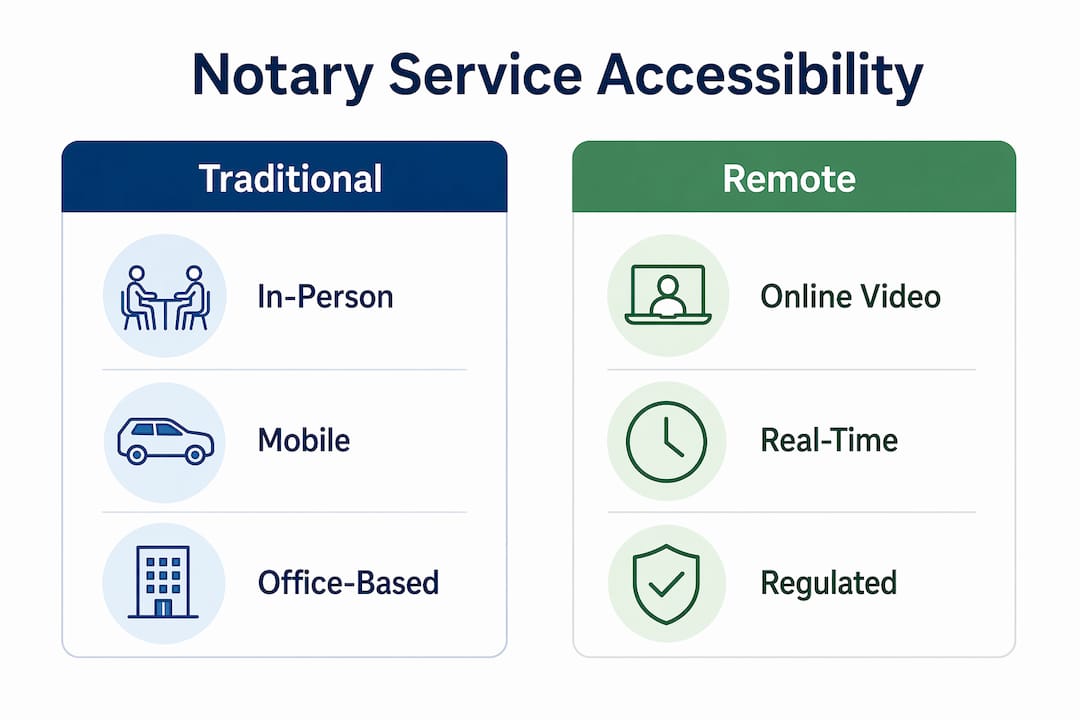
Ontario businesses have three main formats for accessing business notary services: traditional in-person notarization, mobile notary solutions, and remote commissioning of oaths. Each has a different accessibility profile and a distinct legal footprint.

In-person notarization remains the default. A signer travels to a notary’s office and executes documents in person. The accessibility risks here are obvious. Physical barriers, transportation challenges, and scheduling conflicts disproportionately affect people with disabilities, elderly clients, and anyone managing a complex business schedule.
Mobile notary solutions address the location barrier. A commissioned notary travels to the client’s location, whether that is a hospital room, a business office, or a client’s home. This model significantly improves physical accessibility and works well for businesses that routinely execute documents with signers who cannot travel. The trade-off is cost and scheduling lead time.
Remote commissioning of oaths is the most misunderstood option. Under Ontario’s O. Reg. 431/20, remote commissioning requires real-time audiovisual communication and live identity verification. This is not the same as online notarization. Full online notarization, the kind where everything is handled digitally with no physical component, still requires physical presence under current Ontario law. Many businesses assume these are interchangeable. They are not.
| Service type | Physical access | Communication support | Legal status in Ontario |
|---|---|---|---|
| In-person notarization | Depends on office | Arrangements required | Fully established |
| Mobile notary | High (notary travels to you) | Pre-arranged supports needed | Fully established |
| Remote commissioning of oaths | High (no travel required) | Platform-dependent | Permitted under O. Reg. 431/20 with conditions |
| Full online notarization | High in theory | Platform-dependent | Physical presence still required |
Pro Tip: If your business regularly processes documents for clients with mobility limitations, remote commissioning of oaths is currently your strongest legal option for reducing the physical access barrier while staying fully compliant.
Integrating accessibility into your notary workflow
Knowing the rules is one thing. Building them into your day-to-day operations is where most businesses fall short. Here is a practical sequence for making notary public accessibility part of your standard process rather than a reactive scramble.
Designate a notary services contact. Assign one person in your organization who owns notary coordination. This person knows your accommodation policies, maintains your notary vendor relationships, and fields requests. Without a single owner, accommodation requests get lost.
Build accommodation into your scheduling template. Every time you schedule a document signing, your booking confirmation should include a line asking if the signer requires any communication or physical accommodations. This is not burdensome. It is a single sentence. But it sets expectations and gives you lead time to arrange interpreters or alternate formats.
Establish a standing relationship with a notary. Developing recurring relationships with institutions reduces friction dramatically. When your notary already knows your document types, your volume, and your client base, accommodating special requests becomes much faster. Look for notary services that offer dedicated account contacts for business clients.
Schedule standing remote sessions where eligible. For businesses with high notarization volume, recurring remote notarization sessions provide predictable access and reduce the bottlenecks that come from one-off scheduling. This is particularly effective for businesses operating across multiple time zones or with clients in different regions of Ontario.
Document every accommodation request and outcome. Keep a simple log: the date, the accommodation requested, how it was fulfilled, and any feedback received. This log is your evidence of good-faith compliance if questions arise later.
Review your process annually. The 2025 recommendations from the Ontario government signal ongoing refinement of IASR customer service standards. Standardized accommodation request handling is moving from a best practice toward an expectation. Build in a yearly audit of your notary accessibility process.
Understanding public notary requirements in Ontario before you design your process will save you from building around the wrong assumptions.
Common pitfalls businesses get wrong
Most compliance failures in this area are not intentional. They come from misunderstanding where one set of rules ends and another begins. These are the mistakes worth knowing before they cost you.
Treating AODA, remote commissioning, and notarization law as one framework. They are three separate bodies of rules with different triggers and remedies. Mixing these concepts in policies creates gaps where you think you are covered but are not. For example, assuming that offering remote video calls satisfies both your AODA communication obligation and your legal notarization requirement is incorrect.
Skipping the physical presence requirement. Failing to require signers’ presence is the top cause of notary misconduct claims. No accessibility accommodation overrides this obligation. If a document legally requires a signer’s physical presence and you process it without that, the notarization is invalid regardless of your accommodation policies.
Ignoring communication barriers until signing day. Arranging an ASL interpreter or a Braille document the morning of a signing is not feasible. Build lead time into your process, and ask accommodation questions at the booking stage, not the confirmation stage.
No feedback channel. If a client or signer had a poor accessibility experience and has no formal way to report it, you lose both the relationship and the opportunity to fix a systemic problem. A simple email address and a two-sentence commitment to respond within five business days is sufficient.
Assuming remote automatically means accessible. Remote commissioning removes the travel barrier, but if the platform has no captioning, no interpreter support, and no accessible document format, it can create new barriers for different users. Evaluate your remote notary platform against communication accessibility, not just location convenience.
Understanding how online notary accessibility works in Ontario before selecting a remote provider will help you ask the right questions during vendor selection.
My take on accessibility as a business strategy
I’ve spent years watching Ontario businesses treat notary services as a back-office nuisance, something to handle at the last minute with whoever is available. That approach is expensive and getting more so. Not because regulators are suddenly cracking down with massive fines, but because clients notice.
What I’ve seen consistently is that proactive accessibility accommodations in notary processes reduce last-minute document failures. That matters when a deal is closing or an immigration application has a hard deadline.
My honest advice: stop thinking about notary accessibility as a compliance checkbox and start treating it as a client service standard. The businesses that do this well build trust faster, close deals with fewer delays, and spend less time scrambling to fix problems that a simple accommodation question at booking would have prevented. The legal obligations are real, but the business case is equally strong. Accessible service is better service. It is not more complicated than that.
The shift toward remote commissioning and eventually fuller online notarization options in Ontario is going to keep changing what accessibility looks like in practice. The businesses positioned well for that shift are not the ones waiting to see what regulators require. They are the ones already building processes that work for every client, every time.
— Ken
Accessible online notary services built for Ontario businesses
If you are ready to stop piecing together a notary process and start working with a service designed for business clients in Ontario, Theonlinenotary is built exactly for that. Whether you need affidavits, statutory declarations, invitation letters, or solemn declarations notarized, the platform is structured to handle business volume with accessibility in mind.

Theonlinenotary offers online notary services in Ontario available around the clock, with the ability to accommodate accessibility requests for business clients directly through the platform. No scheduling gymnastics. No waiting for office hours. For businesses that regularly process notarial documents and want a consistent, compliant experience, you can also explore the best online notary solutions to compare options and find the right fit for your specific document types and volume.
FAQ
What does AODA require for business notary services?
Under Ontario Regulation 191/11, businesses with more than one employee must provide accessible customer service, including documented accommodation policies, communication supports like ASL or LSQ upon request, and a feedback mechanism for clients who experience accessibility barriers.
Can Ontario businesses use remote notarization for accessibility purposes?
Ontario permits remote commissioning of oaths under O. Reg. 431/20, which requires real-time audiovisual communication and live identity verification. Full online notarization without any physical presence component is not yet fully permitted under Ontario law, so remote commissioning is the current best option for reducing physical access barriers.
How do I find a notary for businesses in Ontario that offers accessibility accommodations?
Look for providers that offer advance accommodation request processes, communication support options, and remote commissioning capabilities. Establishing a recurring relationship with a single provider, rather than sourcing on a per-document basis, significantly reduces the effort required to arrange accommodations each time.
What is the biggest legal risk when mixing up notary accessibility frameworks?
The most serious risk is processing a document without satisfying the physical presence or identity verification requirements of the notarial act because you assumed a remote or accessible format automatically met the legal standard. Invalid notarizations can void contracts, delay applications, and expose your business to liability.
Are mobile notary solutions a good fit for all businesses?
Mobile notary solutions work well for businesses that regularly execute documents with signers who cannot travel, such as hospitals, care facilities, or large employers managing high-volume signings across multiple locations. For lower-volume businesses, remote commissioning of oaths is often a more cost-effective option with comparable accessibility benefits.





