
TL;DR:
- Online notarization for non-residents is convenient but requires verifying acceptance with the destination authority beforehand. The process involves live video, authentic ID like a valid passport, and use of authorized platforms to ensure document validity. Confirmation of requirements and proper legal steps, including possible legalization, are essential to prevent rejection abroad.
If you live outside Canada or the U.S. and need a document notarized for use back home, online notarization for non-residents sounds like the perfect fix. No flights. No embassy lines. Just a video call and a digital seal. The reality is more layered than that. Many non-residents complete the process correctly, only to have their documents rejected abroad because the receiving authority never recognized online notarizations in the first place. This guide cuts through that confusion and gives you a clear, practical path from eligibility to a document that actually gets accepted.
Table of Contents
- Key Takeaways
- How online notarization for non-residents works
- Legal and practical challenges for cross-border notarization
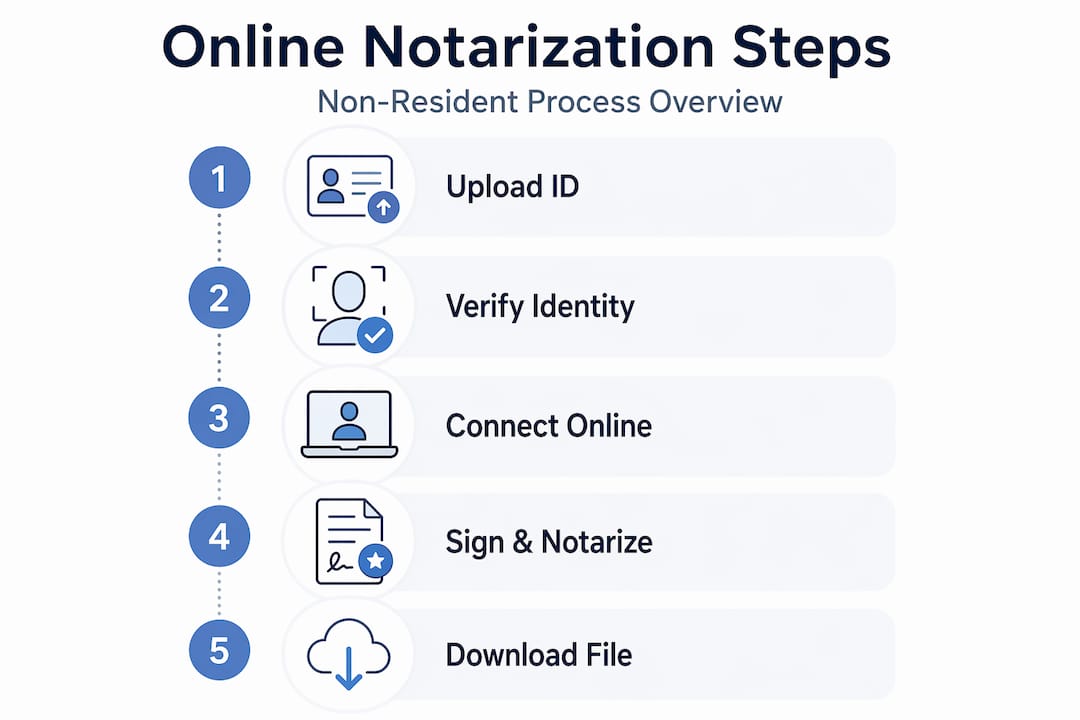
- Step-by-step process for completing online notarization
- Comparing online notary platforms for non-residents
- How to verify your notarized document will be accepted abroad
- My honest take on what non-residents get wrong
- How Theonlinenotary supports non-residents
- FAQ
Key Takeaways
| Point | Details |
|---|---|
| Acceptance is not guaranteed | Confirm with your foreign receiving authority before notarizing that they accept online notarized documents. |
| Passport is your primary ID | Foreign passports are the standard accepted ID for non-residents using remote notarization services. |
| RON requires live video | You must appear on camera in real time; pre-recorded or asynchronous sessions are not valid. |
| Post-notarization steps exist | Apostille or consular legalization may still be required after the notarization is complete. |
| Platform authorization matters | Use only state-authorized platforms with rigorous identity verification to protect document validity. |
How online notarization for non-residents works
Remote online notarization (RON) is the process of having a licensed notary public witness and authenticate your signature through a live audiovisual session, rather than in person. The notary applies a digital seal and electronic signature to your document, which is then stored securely in an electronic journal. It is not the same as simply scanning a wet-ink signature or uploading a PDF. The entire act happens live, in real time, with both parties visible on screen.
For non-residents, the process works the same way as it does for local signers, with a few added layers. Identity verification is stricter because you cannot hand over a physical ID across a desk. Foreign passports are the standard accepted form of ID for non-residents, and they must be unexpired, physical, and machine-readable. Digital copies of passports or expired documents are generally rejected.
The platform itself also matters. State-mandated technical standards for RON include audiovisual technology, digital certificates, secure electronic journal storage, and approved electronic seals. Not every video call tool qualifies. The notary must also be physically located in their authorized jurisdiction at the time of the session, which affects which service providers you can legally use.
Pro Tip: Before booking, ask the platform directly whether their notary is authorized in a jurisdiction whose notarizations are recognized in your home country. This single question saves you from a costly redo.
Here is what the identity verification process typically involves:
- A live, two-way video connection between you and the notary
- Presentation of your unexpired passport to the camera with clear visibility
- Knowledge-based authentication questions in some jurisdictions
- Real-time witnessing of your electronic signature on the document
Legal and practical challenges for cross-border notarization
Here is where most non-residents run into trouble. Completing an online notarization correctly does not mean the document will be accepted abroad. Not all countries or entities recognize remotely notarized documents, and legal acceptance depends on the jurisdiction, the document type, and whether additional legalization steps are required after notarization.
The distinction between notarization and legalization trips people up constantly. Notarization confirms your identity and the authenticity of your signature. Legalization, such as an apostille or consular stamp, confirms that the notary themselves is legitimate in the eyes of a foreign government. Even when a Canadian or U.S. notary completes remote notarization correctly, some countries will reject such documents if they do not recognize electronic signatures or foreign notary commissions.
Rejection risks are high if the receiving authority does not accept electronic notarization or if the notary’s commission is not recognized in the destination country. Always confirm requirements before scheduling your appointment.
Specific situations that create problems include:
- Government submissions: Many immigration authorities and civil registries require wet-ink or in-person notarizations only
- Real estate transactions: Some countries will not accept remotely notarized deeds or power of attorney documents
- Court filings: Foreign courts frequently have specific rules about the format and execution of notarized affidavits
- Bank or financial institutions: International banks may require documents that meet their own internal standards, not just a legal minimum
Proactively confirm acceptance with the exact department or institution that will receive your document. Do not ask a general customer service line. Ask the specific decision-maker or compliance team.
Step-by-step process for completing online notarization
Once you have confirmed that your receiving authority accepts online notarized documents, the actual process is straightforward. Here is how it works from start to finish.
Confirm your eligibility. Most RON platforms accept non-residents as signers, provided they have valid government-issued ID. Check the platform’s specific rules, as some restrict services by country of origin or document type.
Prepare your document. Documents must be in PDF format, uploaded to the platform before your appointment. Review the file carefully. Late arrivals and improperly formatted documents are common causes of appointment cancellations.
Verify your ID is acceptable. Your passport must be physically in hand, unexpired, and clearly readable on camera. Review the platform’s acceptable ID standards before your session. Do not assume your ID will pass without checking.
Schedule your appointment. Most platforms let you book a session online, often with same-day or next-day availability. For Theonlinenotary, you can review the step-by-step notarization process for Ontario-specific guidance before you book.
Attend the video session. The notary witnesses your signing in real time via audiovisual connection. You will be asked to present your ID, confirm your identity, and sign the document electronically during the call.
Pay the fee. Fees typically range from $10 to $25 per signature or session, payable by credit card before the notarization. International packages or apostille-ready document bundles cost more. Check Ontario-specific pricing before budgeting.
Handle post-notarization steps. If your home country requires an apostille, you will need to submit the notarized document to the appropriate government office for that additional certification. Some platforms offer this as an add-on. Others leave it to you.
Pro Tip: Download and save your notarized document immediately after the session. Most platforms store your document securely, but having your own copy means you are not dependent on a third-party server if you need to resubmit or apply for an apostille.
Comparing online notary platforms for non-residents
Not every platform that offers notary services for non-residents is built to the same standard. Here is a practical comparison of what separates reliable providers from ones that could put your documents at risk.
| Feature | What to look for | Red flags |
|---|---|---|
| Jurisdiction authorization | Authorized in a recognized state or province | No clear licensing information |
| Identity verification | Multi-factor, including live ID check | Accepts digital or expired IDs |
| Document security | Encrypted storage, audit trail | No mention of document retention policy |
| Non-resident support | Accepts foreign passports, international clients | Restricted to domestic users only |
| Pricing transparency | Clear per-signature or session fees listed | Hidden fees revealed at checkout |
| Customer support | Live support during or after sessions | Email-only with long response times |
Beyond the table, a few things matter more than they appear on a feature list. Platform reputation in cross-border notarization is one of them. Using state-authorized RON platforms with rigorous identity verification is not optional. Procedural shortcuts, even unintentional ones, can invalidate the entire notarization in a legal setting abroad.
Look for platforms that:
- Publish their notary’s commission details and jurisdiction clearly
- Offer explicit support for international clients and document types
- Provide a complete expert platform comparison so you can evaluate your options before committing
How to verify your notarized document will be accepted abroad
After your notarization is complete, you still have work to do before you hand that document to any foreign authority.

Start by verifying the notary’s digital signature and seal within the PDF itself. Most notarized PDFs include a certificate panel that shows the signer’s credentials, the timestamp, and a tamper-evident status. If that certificate shows as invalid or unsigned, the document has been altered after notarization and is no longer legally valid.
Next, confirm the platform used was state-authorized and that the notary was in their licensed jurisdiction at the time of your session. This detail is often overlooked, but it is the kind of procedural shortcut that gives foreign authorities a reason to reject documents.
Remote electronic notarization is most effective when you combine it with prior checks on document suitability and recipient requirements. The verification steps include:
- Checking the PDF’s digital certificate status before sending
- Contacting the receiving authority with a copy to confirm format acceptance
- Requesting written confirmation of their requirements before you submit
- Determining whether an apostille or consular stamp is also required
Pro Tip: Ask the receiving authority for their requirements in writing, not just a verbal or phone confirmation. Written documentation protects you if the document is later questioned.
Your complete guide to verifying online notarization in Ontario covers additional steps for documents destined for international use.
My honest take on what non-residents get wrong
I have seen the same mistake made repeatedly. A non-resident completes every step correctly, uploads the right documents, appears on camera with a valid passport, and pays the fee. Then the document gets rejected at the foreign consulate or government office because nobody checked with that authority first.
Online notarization has made the mechanics of the process faster and genuinely more accessible. What it has not changed is the legal framework on the receiving end. Foreign governments update their policies slowly, and many still treat electronic notarizations with skepticism, particularly for documents related to property, power of attorney, or family law matters.
What I have learned from working in this space is that the technology is not the weak link. The weak link is the assumption that a completed notarization equals an accepted document. Those are two separate things, and conflating them is where people lose time and money.
My recommendation is always the same. Contact the receiving authority before you do anything else. Get their requirements in writing. Then find a platform with real authorization, real identity verification, and real support for international clients. The convenience of virtual notarization for expats and non-residents is genuine. But it rewards people who do their homework first.
— Ken
How Theonlinenotary supports non-residents

Theonlinenotary offers online notary services in Ontario, Canada, built specifically to handle documents that need to hold up in international settings. Whether you need an affidavit, invitation letter, statutory declaration, or solemn declaration notarized, the platform operates with full authorization and transparent pricing. You get live support, clear document preparation guidance, and an identity verification process that meets legal standards for non-residents. Visit Theonlinenotary services to review available options or book an appointment. If you are not sure which service fits your document type, the team can help you determine the right path before you commit.
FAQ
What ID do non-residents need for online notarization?
Foreign passports are the most widely accepted form of identification for online notarization by non-residents. The passport must be unexpired, physical, and clearly readable on camera during the live session.
Can online notarized documents be used in any country?
No. Not all countries recognize remotely notarized documents, so you must confirm acceptance with the receiving authority before completing the notarization.
How much does online notarization cost for non-residents?
Fees typically range from $10 to $25 per signature or session. International packages or documents requiring apostille readiness may cost more, depending on the platform.
Do I still need an apostille after online notarization?
Often, yes. Notarization confirms your signature is authentic. An apostille or consular legalization confirms the notary’s authority to foreign governments, and many countries require both for official document submissions.
Is online notarization legally valid in Ontario for foreign documents?
Yes, when completed through an authorized platform with a licensed notary. Theonlinenotary operates in Ontario and follows the legal standards required for notarizing documents intended for international use.
Recommended
- Online Notary Guide Ontario 2026: Notarize Documents Remotely – The Online Notary
- Is online notarization legal in Ontario? Your 2026 guide – The Online Notary
- Step-by-step online notarization instructions for Ontario – The Online Notary
- Electronic notarization in Ontario: 2026 legal guide – The Online Notary





