
TL;DR:
- Online notarizations in Ontario are legally valid when performed by authorized notaries using compliant platforms with recorded sessions and secure digital signatures. To verify a notarized document, check the notary’s credentials, confirm platform compliance, review digital signatures and seals, and request the audit trail showing the verification steps. Proper verification is crucial to ensure acceptance by courts and government agencies, protecting against fraud and document rejection.
You received a signed document from an online notary, and now you need to confirm it will actually hold up in court or at a government office. That moment of uncertainty is where most people go wrong — they assume that because a notarization happened online, it must be valid. It may not be. Verifying online notarization is a distinct process with specific legal and technical checkpoints, and skipping it can get your affidavit or statutory declaration rejected at the worst possible time. This guide walks you through every step.
Table of Contents
- Understanding online notarization and its legal status in Ontario
- Core requirements for verifying online notarization in Ontario
- Comparing traditional and modern verification methods of notarizations
- Practical steps to verify an online notarization for your documents
- Common challenges and tips for successful verification of online notarizations
- The overlooked importance of thorough verification in online notarizations
- Trusted online notarization services and verification support in Ontario
- Frequently asked questions
Key Takeaways
| Point | Details |
|---|---|
| Legal acceptance | Online notarizations are legally valid in Ontario when performed on compliant platforms for documents like affidavits and statutory declarations. |
| Verification essentials | Checking notary credentials, platform approval, identity proofing methods, and audit trails are key to verifying genuine online notarizations. |
| Technology methods | Biometric verification and knowledge-based authentication ensure secure signer identity during remote notarizations. |
| Verification pitfalls | Be cautious of uncertified platforms or incomplete documentation that could invalidate online notarizations. |
| Trusted services | Using expert Ontario online notary services simplifies verification and maintains legal compliance. |
Understanding online notarization and its legal status in Ontario
Online notarization lets you have documents witnessed and certified by a licensed notary public through a secure video call, rather than sitting across a desk from one. The notary verifies your identity, watches you sign, and applies a digital seal. No printer required. No commute.
The key distinction from traditional notarization is the medium. Traditional notarization requires physical presence. Online notarization replaces that presence with regulated technology — specifically, secure audio-video platforms, electronic signatures, and digital identity verification tools. The legal weight is the same when done correctly.
Ontario recognizes online notarization for affidavits and statutory declarations under stipulated standards. This means your online notarized document is not a second-class legal instrument. Courts, government offices, and financial institutions in Ontario can and do accept them — but only when the notarization meets specific requirements.
Here is what Ontario’s legal framework for online notarization requires:
- A commissioned Ontario notary public must perform the notarization
- The notary must use an approved platform with verified identity-proofing tools
- The signing session must be recorded with audio and video
- A tamper-evident digital seal must be applied to the final document
- An audit trail must be retained showing who signed, when, and how identity was confirmed
Understanding the purpose of statutory declarations helps you appreciate why these standards exist. A statutory declaration is a legal statement made under oath. If the process that certified it cannot be verified, the document itself loses credibility. That is why verification is not optional.
Core requirements for verifying online notarization in Ontario
Knowing that online notarization is legal is one thing. Knowing how to confirm a specific notarization was performed correctly is another. Here are the core requirements you need to check when validating electronic notarizations.
Confirm the notary’s Ontario credentials. Every notary who performs online notarizations in Ontario must be properly commissioned. Check the Ontario public notary requirements to understand what licensing looks like and where you can verify it.
Verify the platform used. Not every video call counts. The platform must use compliant identity verification technology. Biometric verification for remote notarization, such as facial recognition or fingerprint matching, is increasingly standard. Knowledge-based authentication, where you answer questions only you would know, is also accepted on approved platforms.
Check for secure video and audio recording. The notarization session must have been recorded. If the notary or platform cannot provide proof of a recorded session, that is a red flag.
Confirm a digital signature and seal are present. Open the document file. A valid online notarized document will contain a visible digital seal and a cryptographic signature that proves the document has not been altered since signing.
Request the audit trail. Every compliant platform generates a detailed log: timestamps, IP addresses, identity verification steps, and confirmation of who signed. You should be able to request this record.
Michigan permits biometric verification or knowledge-based authentication on approved remote notarization platforms, setting a precedent for secure digital notarization identity proofing that Ontario practitioners increasingly follow.
Pro Tip: Ask the notary service directly for a copy of the session audit trail before you submit your document anywhere. A legitimate service will provide it without hesitation. If they hesitate, that tells you something.
These steps to verify notarized documents may seem detailed, but they mirror what a court clerk or government officer will check if your document is ever scrutinized. Doing this work upfront saves significant trouble later. Review the full step-by-step online notarization instructions if you want to understand the process from the notary’s side as well.

Comparing traditional and modern verification methods of notarizations
If you have ever notarized something in person, the process is familiar. You show up, present ID, sign in front of the notary, and walk away with a stamped document. Verifying that kind of notarization is equally straightforward: the physical stamp, the notary’s signature, and the date are all on the paper.
Online notarization verification works differently. Here is a direct comparison:
| Verification element | Traditional notarization | Online notarization |
|---|---|---|
| Identity confirmation | In-person ID check | Biometric or knowledge-based digital verification |
| Proof of session | Notary’s physical presence | Recorded video/audio session with timestamp |
| Document integrity | Physical stamp and ink signature | Digital seal and cryptographic signature |
| Audit trail | Paper-based notary log | Electronic log stored by platform |
| Access to records | Manual request to notary | Downloadable from platform |
| Verification speed | Requires contacting notary directly | Often available instantly via platform portal |
The benefits of online verification are real. Audit trails are time-stamped to the second. Digital signatures are mathematically tamper-proof in a way that ink on paper never is. And you do not have to track down a physical notary office to confirm anything.
OneNotary’s enterprise-grade verification technology integrates human verification directly into digital environments, maintaining workflow continuity and strengthening security during notarization. This kind of infrastructure is what separates reliable platforms from questionable ones.
That said, the limitations are worth noting:
- Platform compliance varies, and not every service meets Ontario’s requirements
- You need basic technical literacy to check digital signatures and audit logs
- Some receiving institutions are still unfamiliar with online notarization verification and may need guidance
Pro Tip: When submitting an online notarized document to a government office or court, include a one-page summary of the verification steps you completed. It signals that your document is solid and preempts questions.
Learn more about what qualifies as acceptable online notarization by reviewing what it means to notarize online in Canada and the standards that apply nationally.
Practical steps to verify an online notarization for your documents
This is the part most guides skip over. You know verification matters. Here is exactly how to do it.
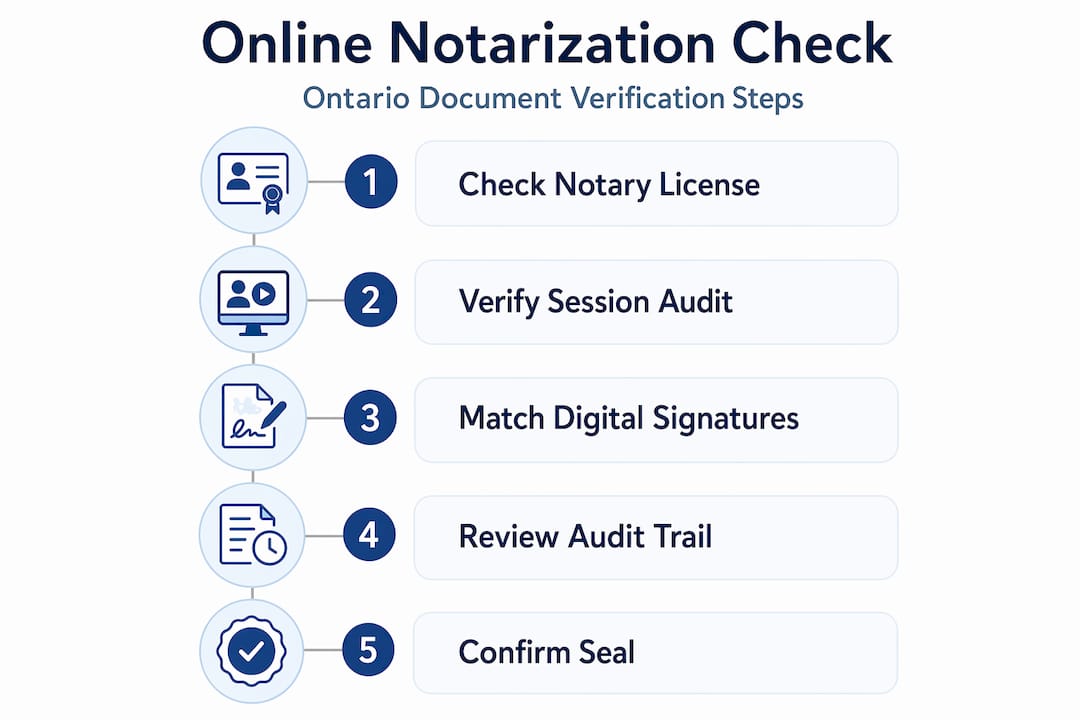
Step-by-step verification helps ensure that online notarized documents will be accepted by courts and government entities in Ontario. Follow this sequence:
Confirm the notary’s registration. Search the Ontario notary public registry or contact the Law Society of Ontario to confirm the notary who signed your document is currently commissioned and in good standing.
Identify the platform used. Ask the notary or check your document for the name of the platform used. Research whether that platform is approved for online notarization in Ontario and complies with provincial identity-proofing standards.
Examine the digital signature. Open your document in a PDF reader. Look for the digital signature panel. It should show the signer’s name, the date and time of signing, and a verification status confirming the document has not been modified.
Review the digital seal. The notary’s electronic seal should be visible on the document. Hover over or click the seal to confirm it is linked to a valid certificate from a recognized certificate authority.
Request and review the audit trail. Contact the platform or the notary to obtain the full session log. This should include identity verification results, the timestamp of every action taken, and confirmation of the video/audio recording.
Key things to look for in the audit trail:
- Confirmed identity match (biometric or knowledge-based)
- Session start and end times
- Electronic signature events with timestamps
- Notary’s digital seal application event
- Platform’s compliance certification references
Once you have confirmed each of these points, your document is verified. You can now submit it with confidence to courts, government agencies, or any institution requiring notarized proof. If you need to notarize multiple documents at once, the same verification steps apply to each one individually.
Common challenges and tips for successful verification of online notarizations
Even with a clear process, people run into real obstacles. Here are the most common ones and how to handle them.
Challenges you will likely encounter:
- Finding that the notary is not listed in any official Ontario registry
- Receiving a document with no visible digital seal or a broken signature verification status
- Discovering the platform used has no stated compliance certifications
- Being told the audit trail “is not available” or was not generated
- Submitting a document to an institution that is unfamiliar with digital notarization verification
Pro Tip: Before using any online notary service, ask them directly: “Can you provide the audit trail after the session?” and “Is your platform approved for Ontario notarizations?” Their answers tell you everything about their credibility.
A notarization authenticity check is only as reliable as the platform that generated the records. If the platform cuts corners on security, no amount of post-signing verification will fully compensate for that gap. Choose your service before you sign, not after.
Due to varying platform standards, careful attention to certification and audit trails is key to confirming online notarizations’ authenticity. This is especially true for legal documents like affidavits where the stakes are high.
To verify a notary in Ontario, use official provincial resources rather than relying solely on the notary’s own website or claims. Cross-referencing two or more sources gives you a much stronger foundation for confidence.
Common errors in the identity verification process to watch for:
- Photo ID that was accepted without a live biometric check
- Knowledge-based authentication questions that were skipped or bypassed
- No record of the signer’s face appearing on video during signing
- Multiple failed verification attempts with no flagging in the audit trail
These are not technicalities. They are signs that the notarization process was not properly conducted, and any document that resulted from it may not survive scrutiny.
The overlooked importance of thorough verification in online notarizations
Here is something most articles will not say directly: many people treat verifying online notarization as a formality. They assume that because they paid a licensed professional and got a digital document back, everything is fine. That assumption is how legal problems start.
The digital notarization verification process exists because fraud is real. Identity theft, forged documents, and uncertified platforms posing as legitimate services are all documented problems in the online notarization space. When you skip verification, you are essentially trusting that nothing went wrong without checking. That is not a legal strategy. That is wishful thinking.
There is also a subtler issue. Platforms evolve. A service that was compliant last year may have changed its verification protocols, lost its certification, or modified its technology in ways that no longer meet Ontario’s standards. The notary you used previously may have let their commission lapse. These are not hypothetical scenarios.
Thorough verification is what separates a document that will hold up from one that will get rejected at a critical moment, possibly when you cannot afford the delay. We have seen individuals submit affidavits for immigration purposes only to have them questioned because the notary could not be verified in any official registry. The cost was weeks of delay and significant legal fees.
The business case is just as strong. If you are a company relying on online notarized contracts or declarations, you need a repeatable verification process, not a one-time check. Build it into your document management workflow. Verify every notarized document the same way, every time.
Trusted online notarization services and verification support in Ontario
If the verification process feels like a lot to navigate on your own, you do not have to do it alone.

We provide trusted online notary services for individuals and businesses across Ontario, covering affidavits, statutory declarations, invitation letters, solemn declarations, and more. Every notarization we perform comes with a complete audit trail, a compliant digital signature, and full documentation you can use to verify the notarization with any court, agency, or institution. Our notaries are properly commissioned, our platform meets Ontario’s legal standards, and our support team is available to walk you through the online notary verification guide if you have questions. We also help when you need to go further, such as when documents require apostilles or additional authentication. Review the Ontario public notary requirements or contact us directly to get started.
Frequently asked questions
Is an online notarization legally valid in Ontario?
Yes, online notarizations are legally valid for affidavits and statutory declarations in Ontario when performed through authorized platforms that meet provincial standards.
How can I check if an online notary is officially licensed in Ontario?
You can confirm the notary’s registration by consulting the Law Society of Ontario or the official Ontario notary public registry, which lists all currently commissioned notaries.
What technology is used to verify identities in online notarizations?
Online notarization platforms use biometric verification or knowledge-based authentication combined with secure audio-video recording to confirm the signer’s identity during the notarization session.
Are online notarized documents accepted by courts and government agencies in Ontario?
Yes, Ontario courts accept online notarized documents, including affidavits and statutory declarations, when they comply with provincial regulations and the notarization can be properly verified.
What should I do if I suspect an online notarization is fraudulent?
Contact Ontario’s regulatory authorities immediately, validate the notary’s credentials through official registries, and seek legal advice to protect your interests and determine the document’s authenticity.





