
Many people assume online notarization in Ontario works just like traditional notarization, only done remotely. That assumption leads to confusion and compliance errors. Ontario law actually permits remote commissioning of affidavits and declarations under specific regulations, not traditional notary powers. The process involves real-time audiovisual communication, strict identity verification, and modified jurats that note the remote nature of the commissioning. This guide walks you through the legal framework, step-by-step procedures, common challenges, eligible documents, and expert tips to ensure your online notarization process in Ontario meets all regulatory requirements and delivers legally valid results.
Table of Contents
- Key takeaways
- Understanding the legal framework for online notarization in Ontario
- Step-by-step guide to the online notarization process
- Common challenges and expert tips for a smooth online notarization
- Types of documents eligible for online notarization in Ontario
- Discover trusted online notary services in Ontario
- FAQ
Key Takeaways
| Point | Details |
|---|---|
| Regulatory framework 431/20 | Ontario Regulation 431/20 governs remote commissioning and requires real time audiovisual communication and strong identity verification. |
| Notary law contrast | Remote commissioning is performed by Commissioners under the Commissioner for Taking Affidavits Act, not by notaries under the Notaries Act. |
| Real time audiovisual | The process must use real time audiovisual communication throughout the session to verify authenticity. |
| Modified jurats required | Documents must include modified jurats that explicitly note the remote nature of the commissioning. |
| Fraud prevention measures | Safeguards like record keeping and precautions against coercion help ensure integrity and auditability of remotely commissioned documents. |
Understanding the legal framework for online notarization in Ontario
Ontario adapted its legal framework during the COVID-19 pandemic to permit remote commissioning of oaths and declarations. Remote commissioning of oaths and declarations is authorized under Ontario Regulation 431/20, which requires real-time audiovisual communication to ensure the authenticity of affirmations. This regulation represents a significant shift from traditional in-person requirements, creating a legally compliant pathway for individuals and businesses to complete affidavits and statutory declarations without physical presence.
The legal distinction between remote commissioning and traditional notarization matters more than most people realize. Commissioners appointed under the Commissioner for Taking Affidavits Act perform the commissioning, not notaries public operating under the Notaries Act. This difference prevents confusion and ensures the correct legal framework applies to your documents. When you search for online notarization in Ontario, you are actually seeking remote commissioning services, not notary public services.
Ontario Regulation 431/20 includes comprehensive provisions designed to maintain document integrity and prevent fraud. The regulation mandates specific identity verification procedures, requires commissioners to take reasonable precautions against fraudulent submissions, and establishes record keeping obligations. These safeguards ensure that remotely commissioned documents carry the same legal weight as those completed in person.
Critical regulatory requirements include:
- Real-time audiovisual communication throughout the entire commissioning session
- Government-issued photo identification verification before administering oaths
- Modified jurats that explicitly state the remote nature of the commissioning
- Documentation of the date and physical locations of both commissioner and deponent
- Reasonable precautions to verify the authenticity of signatures and prevent coercion
- Record retention for audit and verification purposes
“The distinction between online notarization and remote commissioning under the Commissioner for Taking Affidavits Act is critical for legal compliance. Using the wrong terminology or process can invalidate your documents and create costly delays.”
Understanding this legal framework protects you from compliance errors that could invalidate your affidavits or statutory declarations. The regulation balances accessibility with security, creating a process that serves Ontario residents while maintaining the integrity of sworn documents.
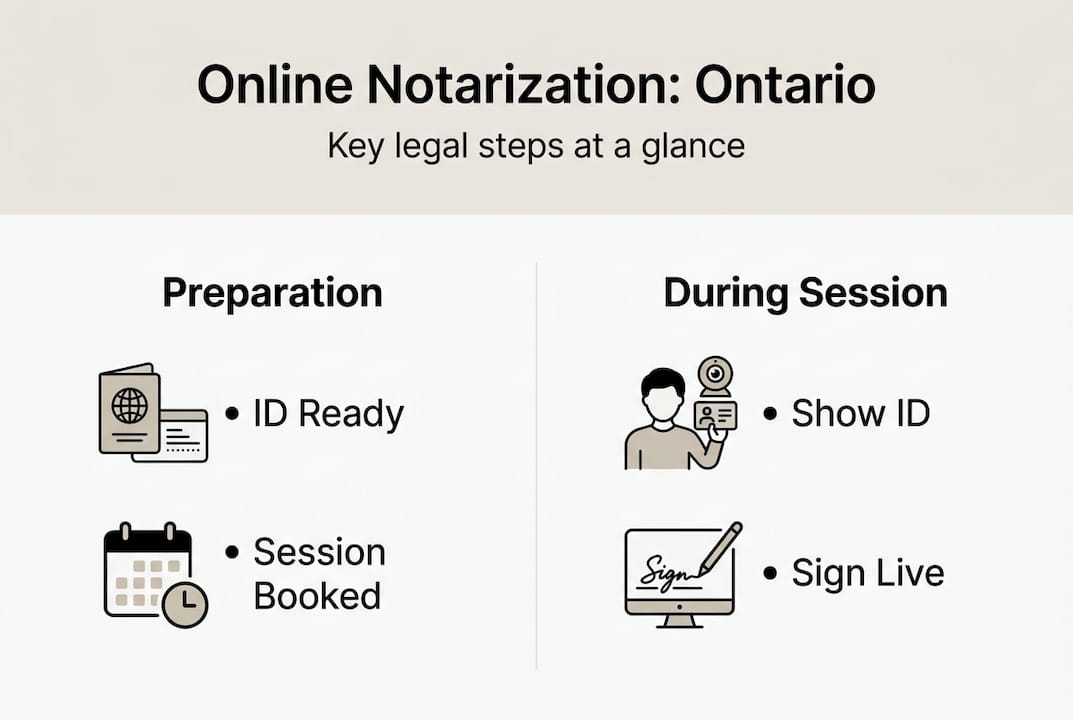
Step-by-step guide to the online notarization process
Completing the online notarization process successfully requires careful preparation and attention to regulatory requirements. Following these steps ensures your documents meet all legal standards and avoid common pitfalls that delay or invalidate remote commissioning.
Step 1: Schedule your remote commissioning session
Begin by scheduling an appointment with an authorized commissioner or lawyer who offers remote commissioning services. Verify their credentials and confirm they are authorized under Ontario Regulation 431/20 to perform remote commissioning. Ask about their technology requirements, session duration, and any preparation steps you need to complete before the appointment.
Step 2: Prepare your technology and environment
Ensure you have access to reliable real-time audiovisual technology for the commissioning session. Test your internet connection, camera, and microphone well before your scheduled appointment. Choose a quiet, well-lit location where you can participate without interruptions or distractions. The commissioner must be able to see and hear you clearly throughout the entire session.
Step 3: Gather your identification and documents
Prepare valid government-issued photo identification such as a driver’s license or passport. Have your unsigned affidavit or statutory declaration ready in digital format. Review the document carefully to ensure all information is accurate and complete before the session begins. You will sign the document during the video call while the commissioner watches.

Step 4: Complete identity verification
During the session, hold your identification up to the camera so the commissioner can verify your identity. The commissioner may ask you to tilt the ID to check security features or ask additional questions to confirm your identity. This step is essential for fraud prevention and legal compliance. Be prepared to answer questions about the document content and confirm you understand what you are swearing or affirming.
Step 5: Sign and receive your commissioned document
The commissioner will administer the oath or affirmation, then watch you sign the document on camera. They will apply a modified jurat that notes the remote nature of the commissioning, including the date and physical locations of both parties. After completing the commissioning, you will receive the fully executed document electronically, typically within 24 hours.
Step 6: Verify and store your commissioned document
Review the commissioned document carefully to ensure the modified jurat is present and all information is correct. Store the document securely for your legal or business use. Keep a copy of any receipts or confirmation emails from the commissioning session for your records.
Pro Tip: Test your technology setup 24 hours before your scheduled session to identify and resolve any technical issues. Confirm your commissioner’s credentials by checking the Law Society of Ontario registry or asking for their authorization details. This preparation prevents delays and ensures a smooth commissioning experience.
Understanding how to get documents notarized online requires attention to both technology and legal compliance. Following these steps carefully ensures your remotely commissioned documents meet all regulatory requirements and carry full legal validity. The process may feel unfamiliar at first, but proper preparation makes it straightforward and efficient. Learn more about virtual notary safety in Ontario to protect yourself throughout the process.
Common challenges and expert tips for a smooth online notarization
Even with clear regulations, many people encounter obstacles during the online notarization process. Understanding these challenges and applying expert strategies helps you avoid delays, rejections, and compliance issues.
Terminology confusion creates compliance errors
The biggest challenge stems from confusing traditional notarization with remote commissioning. Many people search for notary public services when they actually need a commissioner for taking affidavits. This distinction is critical because using the wrong professional or process can invalidate your documents. Remote commissioning operates under the Commissioner for Taking Affidavits Act and Ontario Regulation 431/20, not the Notaries Act.
Technical issues disrupt or invalidate sessions
Poor internet connections, inadequate lighting, or malfunctioning cameras frequently interrupt remote commissioning sessions. Commissioners cannot proceed if they cannot clearly see and hear you throughout the entire process. Technical failures mid-session may require you to reschedule and start over, wasting time and potentially incurring additional fees.
Inadequate identity verification leads to rejections
Some people attempt to use expired identification, documents without photos, or identification that does not clearly match their current appearance. Commissioners must verify your identity to a reasonable standard, and insufficient documentation forces them to refuse commissioning. This rejection delays your legal or business matters and requires you to obtain proper identification before trying again.
Missing or incorrect modified jurats risk legal challenges
Commissioners sometimes forget to include the modified jurat noting the remote nature of the commissioning, or they fail to document both parties’ locations. Documents without proper modified jurats may face challenges in legal proceedings or rejection by institutions requiring sworn statements. Always verify the jurat is present and complete before accepting the final document.
Overlooked record keeping creates proof problems
Many people fail to keep copies of receipts, confirmation emails, or session recordings. If questions arise about the commissioning later, you need proof the process was completed properly. Without records, you may struggle to demonstrate compliance or defend the validity of your document.
Expert tips for success:
- Schedule your session during business hours when technical support is available
- Use a desktop or laptop computer rather than a smartphone for better video quality
- Position yourself in front of a plain background with lighting facing you, not behind you
- Have backup identification ready in case your primary ID is unclear on camera
- Ask the commissioner to confirm they are recording the session or keeping appropriate records
- Request a copy of the session recording or detailed notes for your files
Pro Tip: Before scheduling your remote commissioning session, verify the commissioner is specifically authorized under Ontario Regulation 431/20 to perform remote commissioning. Not all commissioners or lawyers offer this service, and using someone without proper authorization invalidates your document. Ask for their authorization details and confirm they follow all regulatory requirements.
Exploring online notary accessibility in Ontario reveals additional strategies for overcoming barriers and ensuring smooth remote commissioning. The key is preparation, clear communication with your commissioner, and careful attention to regulatory details throughout the process.
Types of documents eligible for online notarization in Ontario
Understanding which documents qualify for remote commissioning helps you plan your legal and business activities effectively. Ontario Regulation 431/20 permits remote commissioning for specific document types, while others still require in-person completion.
Affidavits and statutory declarations represent the primary documents eligible for remote commissioning. These sworn statements form the foundation of many legal, immigration, and business processes in Ontario. The regulation explicitly authorizes commissioners to administer oaths and affirmations remotely for these document types, provided all procedural requirements are met.
Certain legal instruments requiring an oath or affirmation can also be commissioned remotely if the regulation permits. The key factor is whether the document requires a sworn statement from the deponent, not whether it serves a notarial function. This distinction matters because some documents that people commonly associate with notarization actually fall outside the scope of remote commissioning.
Document eligibility comparison:
| Document type | Eligible for remote commissioning | Common restrictions |
|---|---|---|
| Affidavits for court proceedings | Yes | Must comply with court rules and include modified jurat |
| Statutory declarations | Yes | Full compliance with Regulation 431/20 required |
| Solemn declarations | Yes | Commissioner must verify identity and prevent fraud |
| Immigration affidavits | Yes | May require additional authentication for foreign use |
| Invitation letters | Depends | Only if sworn statement format required |
| Real estate documents | Generally no | Often require in-person signing and traditional notarization |
| Powers of attorney | Generally no | Typically require in-person witnessing |
| Certified true copies | No | Require physical document inspection |
Commonly commissioned documents for individuals and businesses:
- Affidavits of support for immigration applications
- Statutory declarations for name changes or identity confirmation
- Affidavits verifying employment, income, or residency
- Solemn declarations for government applications
- Sworn statements for legal proceedings or disputes
- Affidavits confirming facts for business transactions
- Declarations supporting visa or travel document applications
The online notary guide for Ontario provides detailed information about specific document requirements and eligibility criteria. Understanding types of affidavits helps you determine whether your document qualifies for remote commissioning or requires alternative procedures.
Some documents that require notarization under the Notaries Act cannot be commissioned remotely under Regulation 431/20. These typically include documents requiring certification of copies, authentication for international use, or specific notarial acts beyond administering oaths. If your document requires traditional notarization rather than commissioning, you need to seek in-person notary public services.
Always confirm with your commissioner whether your specific document qualifies for remote commissioning before scheduling your session. Providing the document in advance allows the commissioner to verify eligibility and identify any potential issues that might prevent remote completion. This confirmation saves time and prevents frustration from discovering mid-session that your document requires in-person handling.
The scope of approved documents for remote commissioning continues to evolve as Ontario refines its regulations and responds to public needs. Staying informed about current eligibility criteria ensures you choose the right process for your legal and business documents.
Discover trusted online notary services in Ontario
Navigating the online notarization process becomes significantly easier when you work with experienced professionals who understand Ontario regulations inside and out. You need reliable access to commissioners who follow all legal requirements while providing convenient, efficient service.

Access trusted online notary services available 24/7 throughout Ontario, designed specifically for individuals and businesses requiring affidavits, statutory declarations, and solemn declarations. Professional commissioners guide you through every step, from initial consultation to final document delivery, ensuring full compliance with Ontario Regulation 431/20. Explore the best online notary solutions comparison to identify the service that best matches your specific needs, timeline, and budget. Find detailed explanations at understanding types of affidavits to determine exactly which document format serves your legal or business purpose.
Pro Tip: Using professional online notary services ensures your documents meet all regulatory requirements while accelerating the commissioning process, often completing same-day requests that would take weeks through traditional channels.
FAQ
What documents can I notarize online in Ontario?
Affidavits and statutory declarations can be commissioned remotely using the online notarization process under Ontario Regulation 431/20. The commissioner must be specifically authorized to perform remote commissioning. Certain documents requiring oaths or affirmations qualify, while others needing traditional notarization or physical document inspection require in-person completion. Always confirm eligibility with your commissioner before scheduling.
How do I verify the identity of the person remotely?
Identity verification occurs through government-issued photo identification shown during the real-time video call. Commissioners examine the ID on camera and may ask additional questions or request supplementary documents to confirm identity. This critical step prevents fraud and ensures the legal validity of your remotely commissioned document under Ontario regulations.
Is online notarization legally recognized in Ontario?
Documents commissioned remotely under Regulation 431/20 carry full legal validity throughout Ontario. Strict compliance with audiovisual communication and identity verification criteria is mandatory for legal recognition. Remote commissioning differs procedurally from traditional notarization but receives equal legal recognition when all regulatory requirements are met. Courts, government agencies, and institutions accept properly commissioned remote documents.
What technology do I need for online notarization?
You need a device with a working camera, microphone, and stable internet connection capable of supporting real-time video calls. Desktop or laptop computers typically provide better video quality than smartphones. Test your setup before the scheduled session to ensure the commissioner can clearly see and hear you throughout the entire commissioning process.
How long does the online notarization process take?
Most remote commissioning sessions take 15 to 30 minutes, depending on document complexity and identity verification requirements. You typically receive the fully commissioned document within 24 hours after the session concludes. Scheduling availability varies by commissioner, with some offering same-day appointments and others requiring advance booking.
Can I use online notarization for documents needed outside Ontario?
Documents commissioned remotely in Ontario are valid within the province under Regulation 431/20. For use in other provinces or countries, verify whether the receiving jurisdiction accepts remotely commissioned Ontario documents. Some international applications may require additional authentication or apostille services beyond remote commissioning.





