
TL;DR:
- Booking an online notary in Ontario does not guarantee document security or legal validity without ensuring compliance with specific regulations. Remote commissioning under O. Reg. 431/20 requires strict procedures, including real-time identification and audio-visual contact, to be legally valid. Verifying compliance before any session and staying alert to scams are essential steps to protect your interests and ensure enforceable documents.
Many people assume that booking an “online notary” service automatically means their documents are both secure and legally valid. That assumption can lead to serious problems. In Ontario, online notary services are legally distinct from remote commissioning, and a document processed through the wrong type of service may be completely unenforceable, no matter how many security features the platform uses. This article walks you through the legal landscape, essential safety steps, fraud red flags, and a practical checklist so you can protect both your documents and your interests every time.
Table of Contents
- Understanding legal frameworks for online notary in Ontario
- Key safety steps for valid and secure online notarization
- Beware of scams: online notary risks and how to avoid them
- Summary checklist: safe online notarization for Ontario
- Why legal compliance is Ontario’s top online notary safety issue
- Ontario online notary safety: next steps and expert help
- Frequently asked questions
Key Takeaways
| Point | Details |
|---|---|
| Legal compliance first | Remote notarization is only valid in Ontario if performed by a credentialed professional following O. Reg. 431/20 requirements. |
| Verify identity and process | Always use real-time video, confirm government-issued ID, and ensure both the notary and signer are on-camera throughout. |
| Beware digital scams | Expect and independently verify suspicious emails or urgent document-signing requests to avoid fraud. |
| Use a checklist | Follow a clear, step-by-step list for each notarization to ensure security and legal validity every time. |
| Record-keeping required | Online notary sessions require transaction records and special declaration language for full legal validity. |
Understanding legal frameworks for online notary in Ontario
Before you book any remote notary session, you need to know what is actually legal in Ontario. The terms get confusing fast, and the difference matters enormously for whether your document holds up in court, at an immigration office, or with a financial institution.
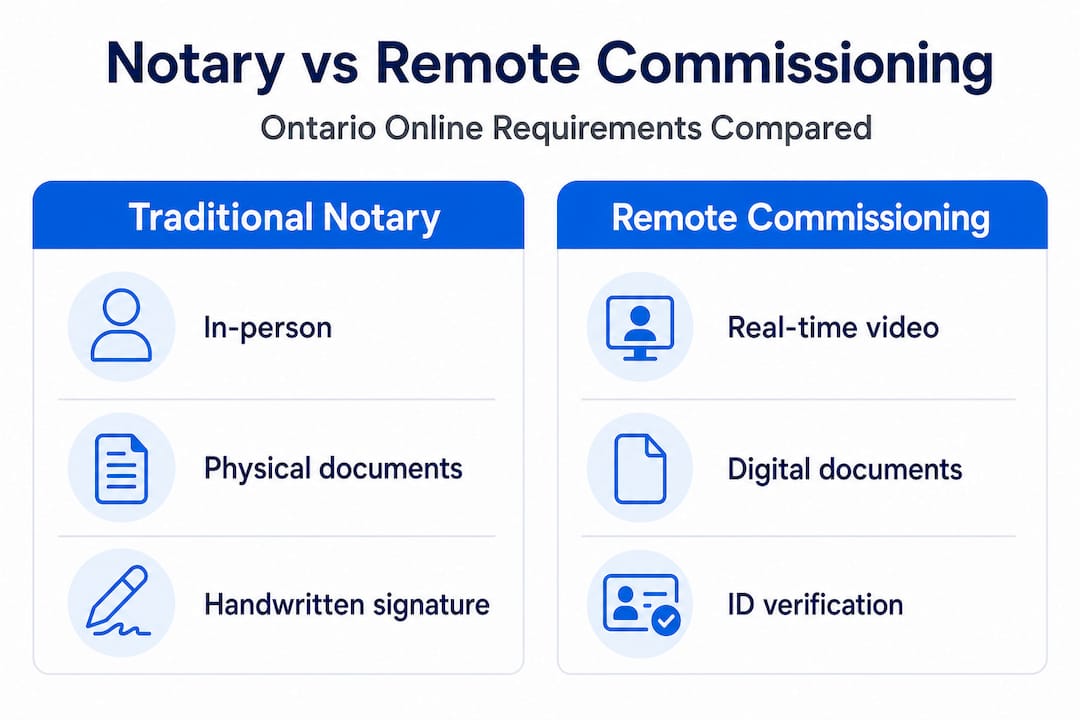
“Online notary” versus remote commissioning: they are not the same thing. A traditional notary in Ontario operates under the Notaries Act, which requires physical presence unless specific regulations allow otherwise. Most “online notary” services advertised on the internet do not meet that standard. Remote commissioning, on the other hand, is a distinct legal process for administering oaths and declarations remotely, and it is governed by its own set of conditions.
Ontario Regulation O. Reg. 431/20 enables remote commissioning for certain documents, but only when specific mandatory conditions are met. This regulation was introduced during the pandemic and has since become the primary legal pathway for legitimately handling sworn documents from a distance.
Here is a side-by-side comparison of key differences:
| Feature | Traditional notarization | Remote commissioning (O. Reg. 431/20) |
|---|---|---|
| Physical presence required | Yes | No, if all conditions are met |
| Audio-visual connection | Not applicable | Mandatory throughout the process |
| Identity verification | In-person ID check | Government-issued photo ID confirmed via video |
| Modified jurat required | No | Yes, must state method and locations |
| Record-keeping obligation | Varies | Mandatory |
| Document types covered | Broad | Specific (oaths, declarations, affidavits) |
Not all documents can be notarized remotely. Certain instruments still require in-person notarization under Ontario law, and submitting a remotely commissioned document when the receiving institution requires physical notarization can invalidate the entire filing.
Understanding online notarization legality in Ontario is genuinely foundational before you move forward with any remote service. You can also review online options and legal realities to get a clearer picture of what services are available and which paths are legally sound.
“Not every service calling itself an ‘online notary’ is operating under a legally permissible framework. Ontario law has specific requirements, and compliance is not optional.”
Pro Tip: Before booking any service, ask directly whether the commissioner operates under O. Reg. 431/20 for remote commissioning. If they cannot answer that question clearly, that is a serious warning sign.
Key safety steps for valid and secure online notarization
Understanding the rules is just the start. The real protection comes from following each required step. Here is how to get it right every time.

The notary verification process in Ontario is more structured than most people realize. Under O. Reg. 431/20, the commissioner must confirm identity and maintain real-time audio-visual contact with the signer throughout the entire session. There is no shortcut or workaround that preserves legal validity.
Follow these steps for every remote session:
Confirm the service operates under O. Reg. 431/20. Ask explicitly. Any legitimate remote commissioning provider in Ontario will confirm this without hesitation.
Use a real-time, stable audio-visual connection. The session must be conducted live. Pre-recorded video is not acceptable. A dropped connection mid-session can potentially invalidate the process, so test your internet connection and camera before the appointment.
Have your government-issued photo ID ready and visible. The commissioner is legally required to verify your identity during the session. Acceptable documents typically include a valid passport or driver’s license. Make sure the ID is current and clearly legible on camera.
Do not alter the document after the session. Once the document has been reviewed and signed, any subsequent changes render it invalid. Send the final version before the session, not a draft.
Confirm the jurat or declaration is modified correctly. The written certification at the end of your document must note the method of remote commissioning and the locations of both parties at the time of signing. This is a specific legal requirement, not a formality.
Ask for confirmation of record-keeping. The commissioner must keep a record of the transaction. This creates an audit trail that protects you if questions arise later about whether the process was properly conducted.
Save all session confirmation emails and receipts. Your own records matter too. Keep a copy of every communication related to the session, including the date, time, and name of the commissioner.
Statistic callout: According to legal process researchers, documents rejected for procedural non-compliance cost businesses and individuals significant time and money, often requiring the entire process to be restarted from scratch. Getting each step right the first time is always the faster and cheaper path.
For a full walkthrough of what each stage involves, the guide on notarizing documents remotely covers the process in practical detail. You can also follow the complete step-by-step online notarization instructions designed specifically for Ontario users.
Pro Tip: Schedule your session at a time when you have reliable internet, good lighting, and no interruptions. A failed session due to technical issues is frustrating and avoidable with a few minutes of preparation.
Beware of scams: online notary risks and how to avoid them
Even when every legal and technical box is checked, there is one more layer of risk. Fraud targeting e-signature and online notary users is real, increasingly common, and deliberately designed to look legitimate.
The BBB warns of e-signature scams that use fake emails, malicious forms, and malware-laced attachments to steal personal data or collect fraudulent signatures. These scams often mimic legitimate services with professional-looking branding and urgent language.
Here are the most common red flags to watch for:
- Unexpected or urgent requests to sign a document you did not initiate. Scammers create false urgency to prevent you from thinking critically.
- Emails from addresses that look almost correct but contain subtle misspellings or extra characters in the domain name.
- Links to unfamiliar platforms or requests to download software before you can proceed with signing.
- Pressure to skip identity verification or requests for sensitive information before any video connection is established.
- Requests for payment via unconventional methods like gift cards, wire transfers, or cryptocurrency.
“The most convincing scams are the ones that look exactly like the real thing. The only defense is to slow down and verify before you click anything.”
Here is a quick reference table for spotting legitimate versus suspicious contact:
| Signal | Legitimate service | Suspicious contact |
|---|---|---|
| Contact initiated by | You (via booking) | Unexpected email or message |
| Communication channel | Known website or confirmed email | Unknown sender, odd domain |
| Identity verification | Required before signing | Skipped or asked for later |
| Platform used | Established, named platform | Unknown or newly created site |
| Payment method | Credit card or established service | Gift card, wire transfer |
| Document provided upfront | Yes, before session | Vague or withheld |
Verifying an online notary before you share any personal information or documents is a non-negotiable step. If you received a request you did not expect, go directly to the company’s official website, found independently through a search, and call their listed phone number to confirm the request is real.
The consequences of falling victim to document fraud are severe. The risks of forged signatures can include federal investigations, civil liability, and permanent damage to your personal or business reputation. The investment of five minutes to verify a contact is always worth it.
Summary checklist: safe online notarization for Ontario
To make all these rules and tips easy to act on, here is a concise checklist you can use before every remote session.
Before the session:
- Confirm the commissioner operates under O. Reg. 431/20
- Verify the commissioner’s credentials through Ontario notary verification resources or the Law Society of Ontario
- Finalize your document before sending; no changes after signing
- Prepare valid, current government-issued photo ID
- Test your camera, microphone, and internet connection
During the session:
- Maintain continuous audio-visual connection throughout
- Allow full identity verification without skipping steps
- Read the document carefully before signing
- Confirm the jurat includes remote method and both parties’ locations
After the session:
- Request or confirm the commissioner has kept a record of the transaction
- Save all confirmation emails and a copy of the signed document
- Store the document in a secure, backed-up location
Under Ontario’s mandatory record-keeping rules for remote commissioning, the auditability of each session is a legal requirement, not just good practice. That record protects both you and the commissioner if the document is ever challenged.
Here is a quick summary of what each checklist item protects you from:
| Checklist item | Risk it prevents |
|---|---|
| Confirm O. Reg. 431/20 compliance | Document invalidity |
| Verify credentials | Fraud or unqualified commissioner |
| Lock document before session | Post-signing alteration disputes |
| Real-time audio-visual throughout | Legal challenge to process validity |
| Modified jurat with locations | Non-compliance with formal requirements |
| Keep session records | Inability to prove process was followed |
Why legal compliance is Ontario’s top online notary safety issue
Here is an uncomfortable truth that most articles about online notary safety skip entirely: technical security is the easy part. Encrypted connections, two-factor authentication, and secure document portals are valuable, but none of them matter if the underlying legal process is invalid.
We have seen individuals spend hundreds of dollars on professionally designed online platforms, complete their sessions without a single technical hitch, and still end up with a document that a government agency or court will not accept. The problem was never the technology. It was that the service they used was not legally authorized to administer oaths and declarations remotely in Ontario.
The highest-impact safety step for anyone dealing with legal documents in Ontario is choosing a legally compliant path. Remote commissioning of oaths and declarations under O. Reg. 431/20 is valid. An ad hoc “online notary” process that does not follow those requirements puts your document at serious risk of being void.
Think of it this way: a document is only as strong as the process that produced it. A perfect PDF with a beautiful digital seal, signed over a crystal-clear video connection, is worthless if the commissioner was not authorized to perform remote commissioning. The receiving institution does not care how smooth the technology was. They care whether the legal requirements were met.
This perspective matters especially for businesses handling employee affidavits, immigration invitation letters, or statutory declarations at scale. One invalid document in a batch can trigger delays, investigations, or rejections across an entire file. The cost of cutting corners on legal compliance is almost always higher than the cost of doing it right.
Our strong advice: always verify legal compliance before the process begins and never assume that a platform’s professionalism signals legal authorization. Those are two completely different things.
Ontario online notary safety: next steps and expert help
You now have the knowledge to protect yourself and your documents. The next step is putting it into action with services you can actually trust.

At The Online Notary, we provide fully compliant remote commissioning for affidavits, statutory declarations, solemn declarations, invitation letters, and more across Ontario. Every session follows O. Reg. 431/20 requirements, including real-time identity verification, proper jurat formatting, and mandatory record-keeping. Before your next session, review the public notary ID requirements so you arrive fully prepared. If you still have questions about what is legally permitted, the guide on remote notarization rules covers the current Ontario framework in plain language. When you are ready to book, explore the full range of Ontario notary services and choose the option that fits your document type and timeline.
Frequently asked questions
Are all online notary services legal in Ontario?
No, only remote commissioning processes that meet the strict requirements of O. Reg. 431/20 are legally permitted. Most generic “online notary” services do not qualify under Ontario law.
How do I verify a remote notary’s credentials in Ontario?
Check the Law Society of Ontario’s directory and confirm the commissioner follows real-time identity-confirming procedures required under O. Reg. 431/20. Never rely solely on a service’s self-description.
What legal documents can be notarized remotely in Ontario?
Affidavits and statutory declarations are the most common documents that can be administered remotely when all required conditions for real-time verification and identity confirmation are fully met.
How can I spot an online notary or e-signature scam?
Watch for unexpected requests with urgent language, unknown links, or requests to skip verification. Always independently verify the sender through official contact details before proceeding.
Do I need to keep records of online notary sessions in Ontario?
Yes. The commissioner is legally required to keep a record of the remote session, and you should retain your own copies of all session confirmations and signed documents for your protection.





