
TL;DR:
- Online notary compliance in Ontario involves a strict sequence of steps—preparation, identity verification, live session, and post-session handling—to ensure legal validity. Failure to follow procedures, such as pre-signing documents or improper record retention, can invalidate notarizations; confirming recipient acceptance beforehand is crucial. The platform Theonlinenotary offers 24/7 authorized services that comply with Ontario regulations, simplifying the entire process for trusted legal documentation.
Online notary compliance steps are the mandatory procedures that determine whether your electronically notarized documents hold legal weight in Ontario courts, government offices, and financial institutions. Remote online notarization (RON) sessions typically take 10 to 20 minutes on specialized platforms available around the clock, but that speed means nothing if the underlying process fails a compliance check. Platforms like Notarize.com and DocuSign Notary have made the technology accessible, yet the legal validity of your document depends entirely on following each procedural requirement in the correct order. One skipped step can render the entire notarization void.
What are the online notary compliance steps in Ontario?
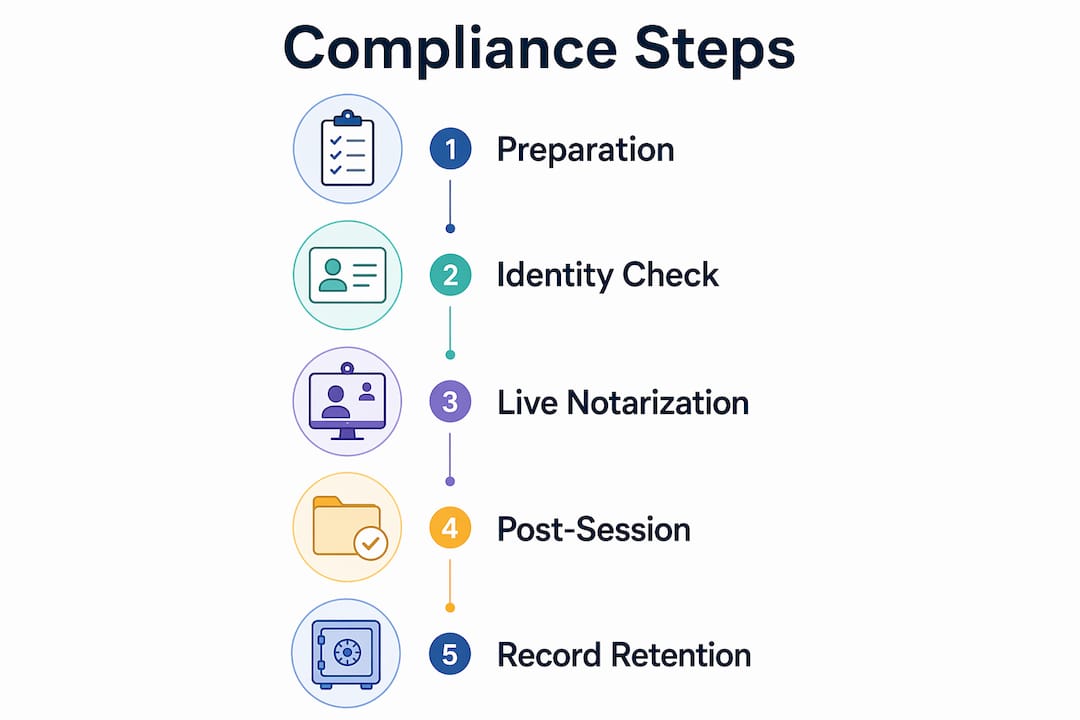
Online notary compliance steps in Ontario cover four distinct phases: preparation, identity verification, live notarization execution, and post-session document handling. Each phase carries specific legal obligations under Ontario’s electronic notarization framework, and a failure at any stage can invalidate the document. Understanding the full sequence before you book a session is the single most effective way to avoid wasted time and rejected paperwork.

The term “remote online notarization” (RON) is the recognized industry standard for what most people call online notarization. Ontario recognizes RON for a growing range of document types, including affidavits, statutory declarations, solemn declarations, and invitation letters. Knowing which document type you are notarizing matters because the procedural rules differ slightly between an acknowledgment and a jurat.
Pro Tip: Before booking any session, check with the receiving institution whether they accept electronically notarized documents. A 5-minute confirmation call with the recipient agency can prevent a costly rejected notarization.
What prerequisites and tools do you need before starting?
Compliance begins before you ever join a video session. The following requirements must be in place before scheduling your notarization.
Required identification:
- A valid, government-issued photo ID (passport, driver’s license, or provincial ID card)
- The name on your ID must match the name on the document exactly
- Expired IDs are rejected at the credential analysis stage without exception
Technology and platform requirements:
- A device with a working camera, microphone, and stable internet connection
- A NIST-compliant RON platform; standard video tools like Zoom or Skype do not meet legal standards
- A current browser with no conflicting extensions that block video or audio
Document preparation checklist:
| Requirement | Why it matters |
|---|---|
| Clean, unaltered PDF format | Tamper-evident technology requires a pristine source file |
| Correct notarial wording included | Missing wording invalidates the notarial certificate |
| Signature fields left completely blank | Signing before the session voids the notarization |
| Document type confirmed as eligible | Not all document types qualify for RON in every jurisdiction |
Pro Tip: Download your document preparation checklist from Theonlinenotary’s preparation guide before your session to confirm every requirement is met.
Most RON platforms combine credential analysis, biometric facial comparison, KBA, and two-factor confirmation to meet identity proofing regulations. This means your technology setup must support camera-based facial scanning, not just audio.
How does the identity verification and notarization process work?
The live session follows a strict sequence. Deviating from this order, even slightly, creates a compliance gap that can invalidate the notarization.
Upload your document to the platform. Log into your chosen RON platform and upload the prepared PDF. The platform timestamps the upload, which becomes part of the audit trail.
Complete credential analysis. The platform scans your government-issued photo ID using optical character recognition and compares the image to a live facial scan. This step confirms the ID is genuine and belongs to you.
Pass Knowledge-Based Authentication (KBA). You must answer at least 4 out of 5 questions correctly within 2 minutes to proceed. Questions are drawn from public records and credit history. This is the step most users underestimate. If you have a thin credit file or limited public record history, alert the platform in advance.
Join the live video session with the commissioned notary. The notary confirms your identity verbally, reviews the document on screen, and verifies that you understand what you are signing. Both parties must be visible and audible throughout.
Sign in the notary’s virtual presence. For jurats specifically, signing before the session can jeopardize compliance because the notary must witness the act of signing. Wait for the notary’s explicit instruction before applying your electronic signature.
Notary applies the digital seal. The notary attaches their digital certificate and electronic seal to the document. This seal is cryptographically bound to the file, making any subsequent alteration detectable.
Session recording is generated and stored. The platform automatically records the full audio-visual session. Recordings must be retained for 5 to 10 years to satisfy regulatory and dispute resolution requirements.
Comparison: acknowledgment vs. jurat notarization
| Feature | Acknowledgment | Jurat |
|---|---|---|
| When signing occurs | Before or during session | Only during session, in notary’s presence |
| Signer oath required | No | Yes |
| Common use cases | Deeds, powers of attorney | Affidavits, statutory declarations |
| Compliance risk if pre-signed | Lower | High; invalidates the notarization |
Pro Tip: Notary authority depends on the commissioning jurisdiction, so confirm your platform enforces Ontario-specific procedural rules, not just the rules of the state or province where the notary is commissioned.
What compliance pitfalls should you watch out for?
Most notarization failures trace back to a small set of predictable errors. Knowing them in advance is the difference between a valid document and a wasted session.
Pre-session mistakes:
- Signing the document before the session starts. This is the single most common reason notarizations are invalidated, particularly for affidavits and statutory declarations.
- Submitting a scanned image instead of a native PDF. Scanned files often fail tamper-evident embedding.
- Failing to confirm that the receiving institution accepts RON documents before booking.
During-session failures:
- KBA failure due to a thin credit file or outdated public records. Some users face 24 to 48 hour lockout periods after failing KBA. If this applies to you, ask the platform about backup verification options such as biometric-only pathways before your session.
- Connectivity drops during the video session. If the connection breaks, do not attempt to continue. Pause the session formally through the platform interface and restart. A partial session recording with gaps can raise compliance questions.
- Expired digital certificates on the notary’s seal. Notaries must keep updated on digital certificate management to avoid session failures caused by incompatible or expired seals.
“Compliance is not just about technology. It requires understanding the regulatory framework and matching platform workflows to jurisdiction rules.” — NotaryGeek
Post-session errors:
- Altering the notarized PDF after download. Any edit, including adding a page or changing formatting, breaks the cryptographic seal and voids the notarization.
- Failing to download the completion certificate alongside the notarized document. The certificate is part of the legal record.
For a full breakdown of Ontario-specific legal requirements, the electronic notarization legal guide from Theonlinenotary covers when electronically notarized documents are accepted across Ontario institutions.
How do you handle post-notarization requirements and international use?
Completing the session is not the final step. What you do with the document afterward determines whether it remains legally valid.
Immediate post-session actions:
- Download the tamper-evident notarized PDF and the completion certificate immediately after the session ends.
- Save both files to at least two secure locations, such as encrypted cloud storage and a local drive.
- Access and save the audit trail link provided by the platform. This link allows institutions to verify the document’s authenticity independently.
Record retention requirements:
| Record type | Minimum retention period | Who is responsible |
|---|---|---|
| Session audio-visual recording | 5 to 10 years | RON platform or notary |
| Audit trail and transaction log | 5 to 10 years | RON platform |
| Notarized PDF and certificate | Indefinitely recommended | Document holder |
Retention periods vary by jurisdiction and must be followed even if a platform subscription ends or a notary’s commission expires. If you switch platforms, confirm that your historical records transfer or remain accessible.
Using notarized documents internationally:
For documents destined for use outside Canada, an apostille may be required. Ontario documents are apostilled through Global Affairs Canada. Re-scanning or re-saving the notarized PDF after receipt breaks the tamper-evident technology and can lead to rejection by foreign authorities. Always transmit the original downloaded file. Confirm acceptance requirements with the specific foreign authority before submitting, as some countries do not yet recognize RON documents regardless of apostille status.
For guidance on notarizing documents for non-residents or cross-border use, Theonlinenotary’s non-resident notarization guide covers the specific compliance steps that apply.
Key takeaways
Following every online notary compliance step in sequence is the only way to guarantee your electronically notarized document is legally valid and accepted in Ontario.
| Point | Details |
|---|---|
| Confirm recipient acceptance first | Call the receiving institution before booking to verify they accept RON documents. |
| Use NIST-compliant platforms only | Zoom and Skype do not meet legal standards; use purpose-built RON platforms. |
| Never pre-sign jurat documents | Sign only during the live session when the notary instructs you to do so. |
| Retain records for 5 to 10 years | Store session recordings and audit trails even after platform subscriptions end. |
| Protect the original PDF | Never re-scan or re-save a notarized file; doing so breaks the cryptographic seal. |
Why recipient confirmation is the step most people skip
I have worked with enough Ontario clients to say with confidence that the single most overlooked step in the entire process is the pre-session confirmation call. People invest time preparing their documents, pass identity verification without a problem, and complete a technically flawless session. Then the document gets rejected because the receiving institution, a foreign embassy, a bank, or a government ministry, does not accept RON notarizations for that specific document type.
That outcome is entirely preventable with a five-minute phone call. I recommend making it a non-negotiable first step, before you even prepare the document.
The second pattern I see consistently is clients using multiple RON platforms without understanding that notary authority is jurisdiction-specific. A notary commissioned in one province or state may not have authority to notarize documents governed by Ontario law. Always verify that the platform you choose enforces Ontario procedural rules, not just the rules of wherever the notary happens to be commissioned.
Looking ahead to the rest of 2026 and beyond, digital certificate management is becoming a more active compliance concern. Notaries who do not monitor their certificate expiration dates are creating session failures that fall on the client to resolve. When you book a session, it is reasonable to ask the notary or platform to confirm their certificate status in advance. That question alone signals that you understand the process and sets a professional tone for the session.
— Ken
How Theonlinenotary makes Ontario compliance straightforward
Theonlinenotary operates a 24/7 authorized platform staffed by expert notaries who specialize in Ontario document requirements, including affidavits, statutory declarations, solemn declarations, and invitation letters. Every session follows the full compliance sequence described in this article, from NIST-compliant identity verification through tamper-evident document delivery and audit trail generation.

If you need a notarized document that will hold up in Ontario courts, government offices, or international institutions, Theonlinenotary’s Ontario notary services are available around the clock with no appointment required. The platform handles remote identity verification, electronic seal application, and secure document storage so you do not have to manage compliance details on your own. For a side-by-side comparison of available platforms, the best online notary solutions guide evaluates top options specifically for Ontario users.
FAQ
What documents can be notarized online in Ontario?
Affidavits, statutory declarations, solemn declarations, and invitation letters are among the document types eligible for online notarization in Ontario. Always confirm eligibility with your notary before preparing the document.
What happens if I fail the KBA identity check?
Some users face a 24 to 48 hour lockout after failing KBA, typically due to thin credit files or limited public records. Ask your platform about backup biometric verification options before your session if this is a concern.
Can I sign my document before the online notarization session?
For acknowledgments, pre-signing carries lower risk, but for jurats such as affidavits and statutory declarations, signing before the session can invalidate the notarization. Leave signature fields blank until the notary instructs you to sign during the live video session.
How long must notarization records be kept?
Session recordings and audit trails must be retained for 5 to 10 years depending on jurisdiction, and this obligation continues even if the platform subscription ends or the notary’s commission expires.
Do foreign authorities accept Ontario RON documents?
Some do and some do not. For international use, an apostille through Global Affairs Canada is often required, and you must transmit the original downloaded PDF without re-scanning or re-saving it to preserve the tamper-evident seal.
Recommended
- Is online notarization legal in Ontario? Your 2026 guide – The Online Notary
- Online Notary Guide Ontario 2026: Notarize Documents Remotely – The Online Notary
- Best Practices for Online Notary Services in Ontario 2026 – The Online Notary
- Online notary tips 2026: 40% faster processing in Ontario – The Online Notary





