
Most people assume that “online notary” means exactly what it sounds like: a notary public who notarizes your documents over the internet. In Ontario, that assumption leads to real problems. The legal reality is more specific, and more limited, than the marketing language suggests. Ontario does not permit full remote notarization. What it does allow is remote commissioning of oaths and declarations, a distinct legal process governed by its own rules. Understanding the difference is not just academic. It determines whether your document will be accepted by the institution, court, or government office you’re submitting it to.
Table of Contents
- Understanding online notary vs. remote commissioning in Ontario
- Which documents are eligible for online commissioning in Ontario?
- Step-by-step: How the online notary process actually works
- Legal, practical, and compliance pitfalls to avoid
- Work with Ontario’s trusted experts for your online notary needs
- Frequently asked questions
Key Takeaways
| Point | Details |
|---|---|
| Remote commissioning, not notarization | Only affidavits and statutory declarations can be commissioned online in Ontario, not formally notarized. |
| Document type matters | Wills, real estate, and certified copy documents must be handled in person to be valid. |
| Recipient rules apply | Always confirm if your document recipient accepts an online-commissioned document. |
| Process is faster online | Remote commissioning is typically 30-60% quicker than in-person alternatives. |
| Correct procedure is critical | Follow Ontario-specific steps and recordkeeping to ensure your document’s acceptance. |
Understanding online notary vs. remote commissioning in Ontario
The phrase “online notary” gets used loosely, and that looseness creates real confusion. In Ontario, remote notarization under the Notaries Act is not permitted. What is permitted is remote commissioning of oaths and declarations by a commissioner of oaths, authorized under Ontario Regulation 431/20. These are two legally distinct processes, and conflating them can invalidate your document.
Service providers often use the term “online notary” because it’s familiar to clients searching online. But as online notary legality in Ontario makes clear, the correct term is remote commissioning, not remote notarization. The distinction matters because U.S.-style Remote Online Notarization (RON), where a notary public witnesses and notarizes documents entirely online, is not available in Ontario. Ontario’s framework is narrower and more specific.
Here’s what each term actually means:
- Remote commissioning: A commissioner of oaths administers an oath or declaration to a signer via live video, permitted under O. Reg. 431/20 for affidavits and statutory declarations
- Notarization: A notary public certifies documents, witnesses signatures, or creates certified true copies. This requires in-person attendance in Ontario
- RON (Remote Online Notarization): A U.S. model allowing full notarization online. Not available in Ontario
The table below shows how these approaches compare:
| Feature | Remote commissioning (Ontario) | In-person notarization | U.S.-style RON |
|---|---|---|---|
| Allowed in Ontario | Yes | Yes | No |
| Documents covered | Affidavits, statutory declarations | All notarial acts | Varies by state |
| Video required | Yes | No | Yes |
| Notary public required | No (commissioner of oaths) | Yes | Yes |
| Certified true copies | No | Yes | Varies |
“Remote commissioning under Ontario Regulation 431/20 is not the same as notarization. Providers who market this service as an ‘online notary’ are using familiar language, but the legal process is distinct and more limited in scope.”
Following best practices for online notary services in Ontario starts with understanding this distinction before you book anything.
Which documents are eligible for online commissioning in Ontario?
Now that we’ve covered the legal framework, let’s explore which documents you can get commissioned online and which you can’t. The answer depends on both the type of document and the institution that will receive it.
Documents that can be remotely commissioned in Ontario include:
- Affidavits (general, financial, identity, immigration-related)
- Statutory declarations
- Solemn declarations
- Invitation letters requiring a sworn statement
Documents that cannot be commissioned or notarized online include:
- Certified true copies of original documents
- Wills and powers of attorney
- Real estate documents
- Passport applications requiring notarization
- Any document where the recipient specifically requires in-person notarization
Understanding the types of affidavits that qualify is essential before you start the process. Not every sworn statement is structured the same way, and some affidavits are used in legal proceedings that may have their own requirements beyond what Ontario Regulation 431/20 covers.
The table below gives you a quick reference:
| Document type | Remote commissioning allowed | In-person required |
|---|---|---|
| General affidavit | Yes | Optional |
| Statutory declaration | Yes | Optional |
| Certified true copy | No | Yes |
| Will | No | Yes |
| Power of attorney | No | Yes |
| Real estate documents | No | Yes |
| Passport notarization | No | Yes |
| Invitation letter (sworn) | Yes | Optional |
One important nuance: even if a document can be remotely commissioned, that doesn’t mean every institution will accept it. Banks, foreign embassies, courts, and government agencies each have their own internal policies. As O. Reg. 431/20 establishes the legal framework, it does not compel recipients to accept remotely commissioned documents. Always confirm with the receiving institution before proceeding.
Pro Tip: Call or email the institution receiving your document before booking an online commissioning appointment. Ask specifically whether they accept documents commissioned remotely by a commissioner of oaths via video. This one step saves you from having to redo the process in person.
For complex or sensitive documents, remote notarization best practices consistently recommend erring on the side of in-person when there’s any doubt about recipient acceptance.
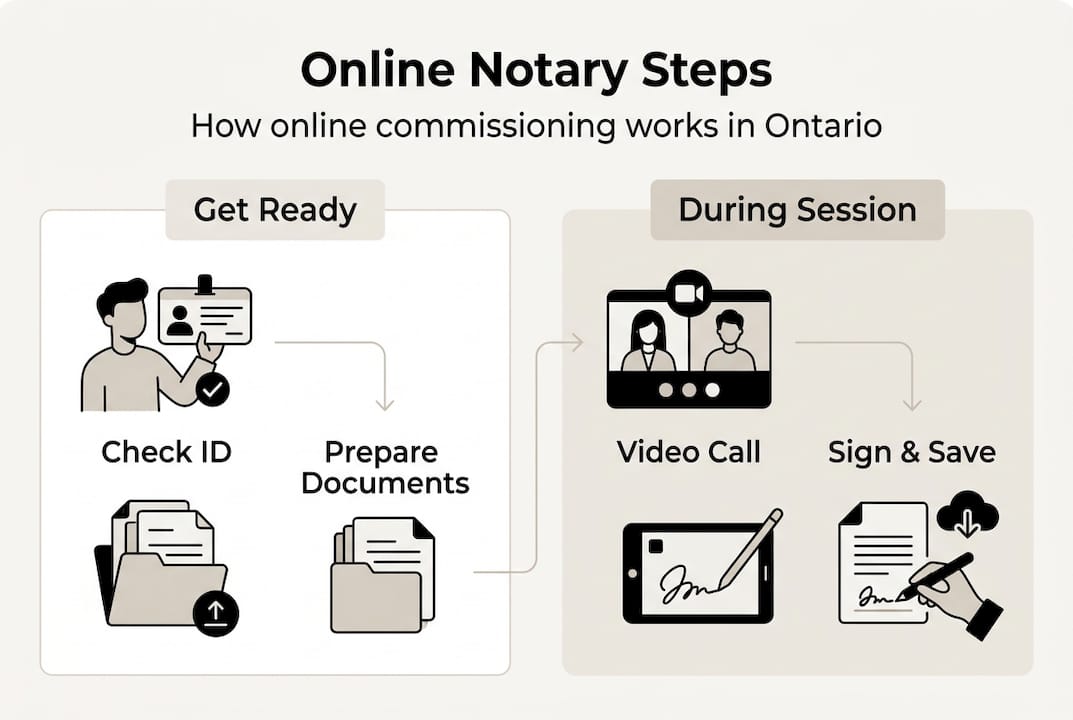
Step-by-step: How the online notary process actually works
Knowing what’s allowed, here’s exactly how you move through the online notary process in Ontario. The steps are straightforward, but a few details trip people up if they’re not prepared.
- Choose a compliant provider. Select a service that uses licensed commissioners of oaths in Ontario and operates under O. Reg. 431/20. Not every provider advertising “online notary” services meets this standard.
- Prepare your document. Draft or obtain the document you need commissioned. Do not sign it yet. Signing before the commissioner administers the oath invalidates the process.
- Book your appointment. Most services offer same-day or next-day video appointments. You’ll receive a link or platform invite.
- Verify your identity. You’ll need government-issued photo ID. Some providers require two pieces of ID. Have these ready before the call.
- Connect via live video. The commissioner will confirm your identity, review the document, and administer the oath or affirmation in real time. This is a live, two-way video session, not a recording.
- Sign the document on camera. You sign while the commissioner watches via video. The commissioner then signs and applies their seal or stamp digitally or via a wet signature on a separate page.
- Receive your commissioned document. You’ll typically receive a digital copy immediately and, if needed, a physical copy by mail.
- Keep your records. Store a copy of the commissioned document and any correspondence with the provider. Commissioners are required to maintain records under Ontario law.
For a detailed breakdown of how to get ready, the guide on preparing for online notary appointments covers everything from document formatting to ID requirements.
On the technology side, you need a device with a working camera and microphone, a stable internet connection, and the ability to share your screen or upload documents. Most sessions run on Zoom, Microsoft Teams, or a provider’s own platform.

One thing most people miss: the 30-60% faster processing that online commissioning offers over in-person appointments is real, but only if you come prepared. Showing up without your unsigned document or proper ID adds delays that erase the time advantage entirely.
Pro Tip: Print your document before the appointment if you plan to submit a physical copy later. Some institutions still require original wet signatures, even on remotely commissioned documents. Confirm the submission format with the recipient in advance.
Legal, practical, and compliance pitfalls to avoid
Even with a clear process, there are several important compliance risks and misconceptions you’ll want to avoid. Some of these mistakes are easy to make, and the consequences range from document rejection to legal liability.
Misrepresenting the document type. A remotely commissioned affidavit is not a notarized document. Submitting it as “notarized” when it was only commissioned is a misrepresentation. The LSO warning on this is clear: documents may be invalid if they are misrepresented as notarized when they were only commissioned online. Always use accurate language when describing your document to the recipient.
Common pitfalls to avoid:
- Signing the document before the video appointment (this voids the commissioning)
- Using a provider whose commissioner is not licensed in Ontario
- Submitting a remotely commissioned document to an institution that requires in-person notarization without checking first
- Assuming that all affidavits qualify for remote commissioning regardless of their purpose
- Failing to keep a copy of the commissioned document and the commissioner’s contact information
“The legal validity of a remotely commissioned document depends entirely on compliance with Ontario Regulation 431/20. A single procedural error, like signing before the oath is administered, can render the entire document invalid.”
Geography matters too. While Ontario Regulation 431/20 requires the commissioner to be physically in Ontario, best practice is for the signer to also be in Ontario during the video session. If you’re outside Ontario or outside Canada, confirm with your provider whether they can still commission your document and whether the receiving institution will accept it.
For a full breakdown of what to watch for, the guide on online notary best practices is worth reviewing before your appointment. And if accessibility is a concern, information on online notary accessibility in Ontario covers accommodations available through remote commissioning services.
Finally, never use remote commissioning for document types that are explicitly excluded. Attempting to get a will, power of attorney, or certified true copy commissioned online is not just ineffective. It may create a document that appears valid but is legally unenforceable.
Work with Ontario’s trusted experts for your online notary needs
With these risks in mind, your best bet is to choose an expert service that guides you every step of the way. Navigating Ontario’s remote commissioning rules on your own is manageable, but working with a provider who knows the legal requirements inside and out removes the guesswork entirely.

At The Online Notary, we specialize in remote commissioning of affidavits, statutory declarations, invitation letters, solemn declarations, and more, all fully compliant with Ontario Regulation 431/20. Our commissioners of oaths are licensed in Ontario and walk you through every step of the process, from document preparation to final delivery. You can explore our full range of online notary services to find the right fit for your situation. If you’re not sure where to start, the guide on how to prepare for online notary appointments gives you a clear checklist before you book. Fast, compliant, and straightforward: that’s what remote commissioning should feel like.
Frequently asked questions
Can I fully notarize a document online in Ontario?
No. Ontario only permits remote commissioning of affidavits and declarations by a commissioner of oaths. Full online notarization under the Notaries Act is not allowed.
Which documents can be commissioned online in Ontario?
Remote commissioning is available for affidavits and statutory declarations. Documents like certified copies, wills, powers of attorney, real estate documents, and passport notarizations all require in-person notarization.
Do all institutions accept documents commissioned online?
No. Some banks, embassies, and government offices require in-person notarization regardless of Ontario’s remote commissioning rules. Always confirm with the receiving institution before booking your appointment.
Do I need to be physically in Ontario for remote commissioning?
The commissioner of oaths must be in Ontario. Best practice is for the signer to also be in Ontario during the video session, though confirm with your provider if you’re located elsewhere.
How fast is the online notary process compared to in-person?
Online commissioning is typically 30-60% faster than traditional in-person appointments, provided you arrive at the video session with your unsigned document and valid ID ready.
Recommended
- Master the online notarization process in Ontario: guide – The Online Notary
- Online Notary Guide Ontario 2026: Notarize Documents Remotely – The Online Notary
- How to Notarize Documents Online in Ontario: Fast & Secure Guide to Online Notary Services (2025) – The Online Notary
- How to Notarize Online in Ontario 2025: Easy Guide – The Online Notary
- Role of Solicitors Explained: Complete 2024 Guide | Ali Legal





