
TL;DR:
- Remote commissioning in Ontario is legal if conducted by an LSO-licensed commissioner via live video.
- Only affidavits, statutory declarations, and similar documents can be online commissioned; others require in-person notarization.
- Verify recipient acceptance and use licensed providers to ensure legal validity and avoid rejection.
If you’ve searched “notary near me” in Ontario and wondered whether you could just handle everything online, you’re not alone. Many residents and small business owners assume that online notarization either doesn’t exist here or is completely legal in the same way it is in some U.S. states. The reality sits somewhere in the middle. Remote commissioning under O. Reg. 431/20 allows oaths and declarations via real-time audio-video, making it possible to get your affidavit or statutory declaration signed without ever leaving your home or office.
Table of Contents
- What is an online notary in Ontario?
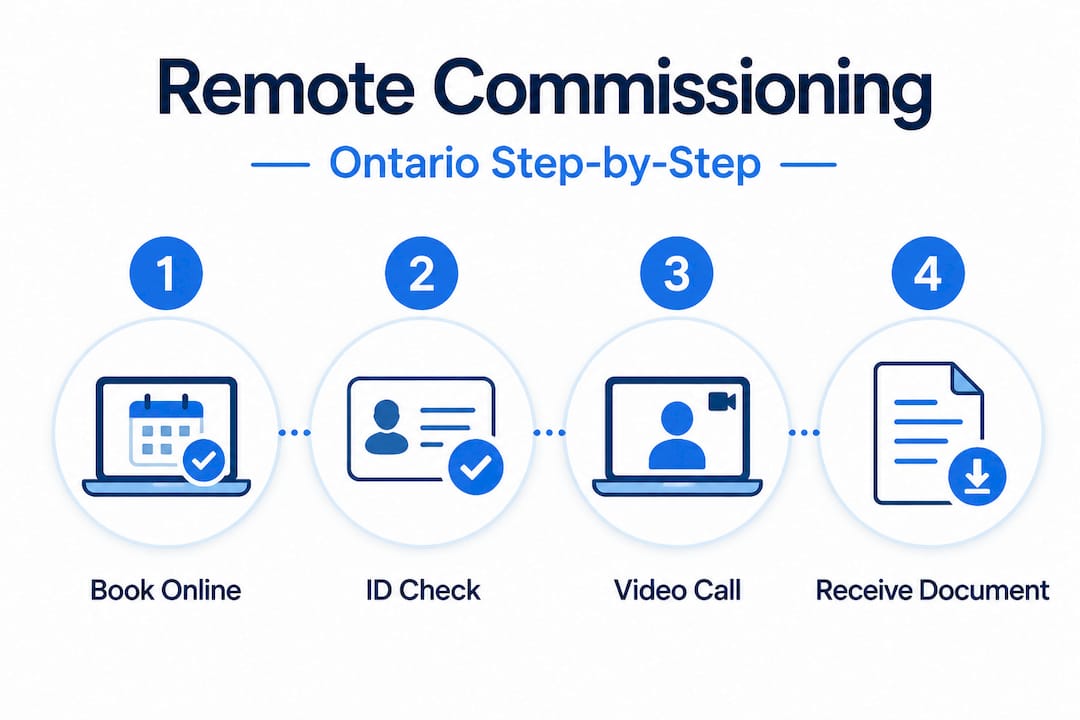
- How remote commissioning works: The step-by-step process
- Which documents can (and can’t) be notarized online?
- Tips, pitfalls, and choosing the right notary service
- The reality behind ‘notary near me’: What most guides won’t tell you
- Ready to commission your document online?
- Frequently asked questions
Key Takeaways
| Point | Details |
|---|---|
| Remote commissioning legal | In Ontario, affidavits and declarations can be commissioned online using real-time video calls. |
| Not all docs eligible | Wills, powers of attorney, and certified copies still require in-person notarization. |
| Check recipient acceptance | Before using remote services, always confirm whether your recipient accepts online-commissioned documents. |
| LSO-licensed providers only | Choose notary services regulated by Ontario’s Law Society for legal compliance and reliability. |
| Tech preparation matters | Optimize your setup and have your identification ready for a smooth online commissioning process. |
What is an online notary in Ontario?
With the confusion addressed, let’s clarify exactly what an online notary can and cannot do in Ontario.
When most people say they want an “online notary,” they picture a fully digital process where any notary can stamp a document remotely. That’s not quite how it works here. Ontario law draws a clear line between two things: full online notarization and remote commissioning. Understanding that difference will save you time and prevent costly mistakes.
Full online notarization in the way some U.S. platforms offer it is not permitted under Ontario’s Notaries Act. A notary public in Ontario cannot authenticate or certify documents entirely online. However, remote commissioning for affidavits is fully legal when performed by a commissioner of oaths who holds a license from the Law Society of Ontario (LSO). Commissioners are typically lawyers or licensed paralegals. They can administer oaths and take sworn declarations over a live, two-way video call.
The legal equivalence is real. If the process follows O. Reg. 431/20 correctly, your remotely commissioned document carries the same legal weight as one signed in person. Want to understand more about what online notary means in the Ontario context? The distinction is worth reading up on before you book.
| Feature | Full online notarization | Remote commissioning (Ontario) |
|---|---|---|
| Legal in Ontario? | No | Yes, under O. Reg. 431/20 |
| Who provides it? | Notary public | LSO-licensed commissioner |
| Accepted documents | Varies | Affidavits, statutory declarations |
| In-person required? | No | No |
| Same legal weight? | N/A | Yes, if process followed |
Important: Remote commissioning in Ontario is not the same as full online notarization. Only LSO-licensed commissioners can legally provide this service, and only for specific document types.
How remote commissioning works: The step-by-step process
Now that you know the legal framework, let’s break down exactly how you can commission your document online from start to finish.
The process is more straightforward than most people expect. You don’t need to print anything in advance, drive anywhere, or wait in a waiting room. The whole appointment typically takes 15 to 30 minutes, and you walk away with a legally valid PDF. Here is exactly what happens.
Book your appointment. Contact an LSO-licensed provider and select the document type you need commissioned. Most services offer online scheduling and allow you to upload your document beforehand for review.
Prepare your document. If you’re submitting an affidavit, make sure it is complete but unsigned. You must swear or affirm the document live during the session. Signing before the appointment invalidates the process.
Verify your identity on the video call. This is one of the most critical steps. You’ll present government-issued photo ID on camera. Some providers also ask you to upload your ID before the appointment to speed things up. The commissioner reviews it in real time.
Swear or affirm your oath. During the live video call, the commissioner administers the oath or affirmation. You declare that the contents of the document are true, either by swearing on a religious text or by affirming (a non-religious alternative that carries equal legal weight).
Sign the document on camera. After the oath, you sign the document while the commissioner watches via the video call. This real-time observation is what makes it legally valid.
Receive your final document. The commissioner signs electronically and delivers a PDF with a modified jurat that notes the remote method, the commissioner’s location, and your location. This jurat modification is required under O. Reg. 431/20.
Review the online notary verification steps before your appointment so you know what to expect and arrive prepared.
Pro Tip: Test your audio and video at least 30 minutes before your appointment. A poor connection or a camera that doesn’t show your face clearly can delay or invalidate the session. Use a well-lit room, and hold your ID close enough to the camera that text is readable.
| Step | What you do | What the commissioner does |
|---|---|---|
| Booking | Schedule online, upload document | Reviews document for eligibility |
| ID verification | Present photo ID on camera | Confirms identity in real time |
| Oath/affirmation | Swear or affirm verbally | Administers the oath on camera |
| Signing | Sign document on screen | Witnesses signature live |
| Final delivery | Receive PDF | Applies electronic signature and modified jurat |
Which documents can (and can’t) be notarized online?
Understanding the process is crucial, but it’s just as important to know what types of documents you can legally commission online and which ones still require in-person visits.

Not everything can go through a remote commissioning session. The scope is narrower than you might hope, but for most everyday needs, including affidavits for court, statutory declarations for insurance claims, invitation letter declarations, or solemn declarations, remote commissioning covers you completely.
Documents you can commission online in Ontario:
- Affidavits (general, financial, family law-related, etc.)
- Statutory declarations
- Solemn declarations
- Invitation letter declarations
- Most sworn statements for insurance or employment purposes
Documents that still require in-person visits:
- Wills and codicils
- Powers of attorney (both property and personal care)
- Certified true copies of original documents
- Land transfer documents requiring a notarial certificate
- Notarized documents intended for use in foreign jurisdictions (these often require a specific notarial certificate or apostille)
Reality check: Even if remote commissioning applies to your document type, the recipient of that document has the final say. Before you book your appointment, confirm recipient acceptance with ServiceOntario, the court, or the government body you’re submitting to. Some agencies have not yet updated their internal policies to accept remote-commissioned documents.
This last point is where many people get tripped up. You could follow every step correctly, receive a perfectly valid remotely commissioned document, and then have a clerk at a government office refuse it because their internal guidelines haven’t caught up with the regulation. That’s a frustrating situation, and a quick phone call beforehand eliminates the risk entirely.
It’s also worth noting that documents intended for use outside Ontario may face additional requirements. If you’re submitting a document to a foreign embassy or government body, ask the receiving organization whether they require an apostille or a specific notarial certificate that goes beyond remote commissioning. Some countries will not accept documents unless they carry a notarial seal from a commissioned notary public in the traditional sense.
Tips, pitfalls, and choosing the right notary service
You now know what’s possible and what’s not. Let’s make sure you avoid headaches with some essential tips for choosing a reliable remote notary.
Choosing the wrong provider is the single biggest mistake people make. Ontario has no shortage of people offering “notary services” online, but not all of them are licensed to administer oaths. An unlicensed provider cannot legally commission your document, and a document commissioned by an unlicensed individual is not valid. Period.
What to look for when choosing a remote commissioning provider:
- Confirm the provider is licensed by the LSO as a lawyer or paralegal. You can verify LSO licensing status through the Law Society’s public directory.
- Ask whether they specifically commission the document type you need. Some providers specialize in certain areas.
- Check whether they use a secure, encrypted video platform for the appointment.
- Confirm their turnaround time for delivering the final signed PDF.
Common pitfalls to avoid:
- Missing ID. If you don’t have acceptable government-issued photo ID, the session cannot proceed. Review the Ontario notary ID requirements for your appointment. A driver’s license or passport works. A credit card does not.
- Pre-signing your document. This is a surprisingly common error. If you sign before the session, the commissioner cannot witness it in real time, which is a requirement. Start fresh with an unsigned copy.
- Booking without confirming recipient acceptance. As mentioned above, confirm the receiving organization accepts remotely commissioned documents before you pay for or schedule anything.
- Using unlicensed providers. Some websites claim to offer notary services online but are not operated by LSO-licensed commissioners. Always verify credentials.
- Unstable technology. Dropped video calls mid-oath are more than awkward. They may invalidate the session and require you to start over.
Pro Tip: Before your appointment, download or print a checklist: valid ID, unsigned document, stable internet, working camera and microphone, quiet environment. Five minutes of preparation prevents 90% of common problems.
The reality behind ‘notary near me’: What most guides won’t tell you
Here is a deeper look at what most people and guides miss when searching for a notary in Ontario.
When you type “notary near me” into a search engine, the results almost always point you toward physical offices. Law firms. Shipping stores that offer notary services on the side. Banks with staff commissioners. That local mindset made sense before 2020, but it’s increasingly outdated for residents of Ontario.
The pandemic accelerated something that was already quietly underway: the recognition that most sworn documents don’t actually need two people in the same room. The oath is about your genuine commitment to telling the truth, not about the physical proximity of a witness. Ontario’s regulatory framework caught up with this reality through O. Reg. 431/20, and yet the cultural expectation of “finding someone nearby” persists.
What most guides don’t tell you is that the search for a physical notary often introduces unnecessary friction. You take time off work. You commute. You wait. You pay parking. And then you discover the commissioner is only available on Tuesday afternoons. Meanwhile, someone across town with a stable internet connection got the same document commissioned in 20 minutes from their kitchen table.
The genuine limitation, though, is one that not enough guides acknowledge openly: remote commissioning increases accessibility enormously, but it is not unlimited. You still need to verify the document type is eligible, confirm recipient acceptance, and use a properly licensed provider. The “convenience” of choosing a random online service that hasn’t been vetted can cost you more time and money than just visiting a physical office in the first place.
The hidden cost of unverified services is real. We’ve seen clients submit documents that were rejected because the person who commissioned them wasn’t licensed, or because the jurat didn’t include the required modifications under O. Reg. 431/20. Fixing those mistakes often means starting the entire process over, sometimes under a deadline. Choosing an LSO-licensed provider from the start isn’t just about compliance. It’s about getting it right the first time.
Ready to commission your document online?
Understanding your options is only useful if you know where to get started. Here’s how you can commission your affidavit or declaration right now.
If you need an affidavit, statutory declaration, solemn declaration, or invitation letter commissioned quickly and correctly, working with a trusted LSO-licensed provider makes the process simple, secure, and legally sound.

At The Online Notary, we offer Ontario online notary services for individuals and small businesses across the province. No commuting, no waiting rooms, and no missed afternoons at work. Our commissioners are LSO-licensed, our video platform is secure, and our process follows every requirement under O. Reg. 431/20. Before you book, review the Ontario notary requirements to make sure your document and ID are ready, and explore the affidavit types in Ontario we handle if you’re unsure which form applies to your situation. We’re here to make the process easy.
Frequently asked questions
Is full online notarization legal in Ontario?
No, but remote commissioning for affidavits and declarations is fully permitted under O. Reg. 431/20 when conducted by an LSO-licensed commissioner via real-time video call.
What documents can I commission online?
You can commission affidavits and statutory declarations online, but wills, powers of attorney, and certified copies still require in-person visits with a commissioner or notary public.
Do courts and the government accept online-commissioned documents?
Most do, but policies vary by agency, so always confirm recipient acceptance with the specific court, government body, or institution before booking your appointment.
How do I prove my identity for an online notary appointment?
Your identity is verified live during the video call ID check, where you present government-issued photo ID on camera; some providers also request an upload before the session.
Is remote commissioning valid across Ontario?
Yes. Remote commissioning carries the same legal weight as in-person commissioning everywhere in Ontario, provided all steps under O. Reg. 431/20 are properly followed by a licensed commissioner.