
TL;DR:
- Many individuals and businesses in Ontario mistakenly believe notaries can certify any document, including vital records like birth certificates, which they cannot. Digital notarization involves verifying documents that already contain a valid notarial certificate, with the process requiring proper preparation, PDF flattening, and live video sessions for authentication. Not all documents qualify for notarization; vital records must be obtained from government authorities, while affidavits serve as legal alternatives for non-governmental copies.
Getting digital copies notarized in Ontario trips up more individuals and businesses than you’d expect. A common assumption is that a notary can certify any document you hand them, including a birth certificate or marriage record. That’s not how it works. The reality around digital copies for notarization is more nuanced, and understanding those distinctions can save you significant time, money, and frustration. This guide walks you through exactly what digital notarization means under Ontario law, which documents qualify, how to prepare your files correctly, and how to get the whole thing done without leaving your home.
Table of Contents
- Key takeaways
- What digital copies for notarization actually mean in Ontario
- How to prepare your digital copies for notarization
- Documents that can and cannot be digitally notarized
- Notarizing digital copies for signers with disabilities
- My take on digital notarization in Ontario
- Get your documents notarized online with Theonlinenotary
- FAQ
Key takeaways
| Point | Details |
|---|---|
| Not all copies can be notarized | Notaries cannot certify vital records; you must obtain these from government authorities directly. |
| Document format matters | PDFs must be complete, properly structured, and flattened before uploading to any notarization platform. |
| RON is fully digital | Remote Online Notarization uses live audio-video and digital seals, making it faster than mail-based alternatives. |
| Affidavits fill the gap | When certified copies aren’t available from a notary, an affidavit for copy of original is a recognized legal workaround. |
| Inclusion is built in | Signers with physical impairments can use signature by mark or proxy, both legally valid in Ontario. |
What digital copies for notarization actually mean in Ontario
Most people use the terms “certified copy” and “notarized copy” interchangeably. They are not the same thing, and confusing them is the number one reason documents get rejected.
A certified copy is an official duplicate of a government record, issued by the authority that holds the original. Think Service Ontario, the Office of the Registrar General, or a federal agency. A notarized digital copy, by contrast, is a digital document that a commissioned notary has witnessed, authenticated, or attached a notarial certificate to, confirming its contents or the identity of the signer.
The legal framework in Ontario
Ontario’s electronic notarization rules have evolved considerably. Under Ontario Regulation 431/20, digital notarization is fully legal and enforceable, provided the process meets specific requirements around identity verification, audio-video technology, and tamper-evident sealing. This regulation opened the door to Remote Online Notarization (RON), which allows the signer and notary to connect via secure video, sign electronically, and apply a digital notary seal, all without a single piece of paper.
There is also a less-understood method called Remote Ink-Signed Notarization, or RIN. Under RIN, you sign a physical document in ink and then mail it to the notary. RON, by contrast, is a fully digital end-to-end process, with no paper involved at any stage.
One rule applies to both methods without exception: the document you submit must already contain a valid notarial certificate or jurat block. A notary will not write this language for you from scratch. If your document arrives without the correct certificate language, the notarization cannot proceed.
Pro Tip: Before submitting any document, check that it contains a jurat or notarial certificate block with blank spaces for the notary’s signature, seal, and date. If it doesn’t, ask the requesting party to provide an updated version or contact your notary in advance.

How to prepare your digital copies for notarization
Preparation is where most submissions fall apart. Follow these steps and you will avoid the most common delays.
Confirm the document is complete. Every field that you are responsible for filling in should be completed before you approach a notary. Blank fields that belong to you signal an incomplete document.
Verify the notarial certificate is present. As noted above, valid certificate language must already be embedded in the document. This is not the notary’s job to add.
Convert to PDF format. RON platforms almost universally require documents in PDF format. Scan your physical documents at a minimum resolution of 300 DPI, or export digital documents directly to PDF to preserve formatting.
Flatten the PDF. Flattening the PDF locks all form fields and removes editable layers, making the file static and tamper-evident. Most PDF editors (Adobe Acrobat, Preview on Mac) have this function under Print Settings or Save As options.
Complete identity verification. RON platforms require government-issued photo ID. Many platforms also use knowledge-based authentication, which presents questions derived from your credit file or public records to confirm your identity remotely.
Attend the video session. You will join a live audio-video call with the notary. Do not sign the document beforehand. Signing before the notary witnesses it invalidates the notarization entirely.
Receive your notarized document. After the session, the notary applies a digital seal and tamper-evident certificate. You receive a PDF that includes the audit trail and is legally accepted for most purposes in Ontario and beyond.
Pro Tip: If you’re wondering how to get a form notarized online for an employer or immigration authority, check whether they accept RON-notarized PDFs before you start the process. Some international institutions still require wet-ink signatures, and confirming this upfront saves a repeat appointment.
For Ontario-specific requirements around how copies are legally recognized, the certified copy requirements guide from Theonlinenotary covers the relevant statutes in detail.
Documents that can and cannot be digitally notarized
Not every document is eligible for notarization by a private notary. Knowing the difference between what qualifies and what does not will keep you from wasting time on a dead end.
Vital records are off-limits for notary certification
Notaries cannot certify copies of birth certificates, death certificates, or marriage certificates. These are government-issued vital records, and only the issuing authority can produce an official certified copy. In Ontario, you obtain certified copies of birth, death, and marriage records directly through ServiceOntario or the Office of the Registrar General. Turnaround times vary, and standard processing can take several weeks depending on the document type and service level you select.
When an affidavit fills the gap
If you need to confirm that a copy of a document is a true representation of the original, and that original is not a vital record controlled by the government, you have a strong legal alternative. An affidavit for copy of original is a sworn statement you sign before a notary, declaring that the attached copy is a true copy of the original in your possession. This is widely accepted in Ontario courts, financial institutions, and immigration applications.
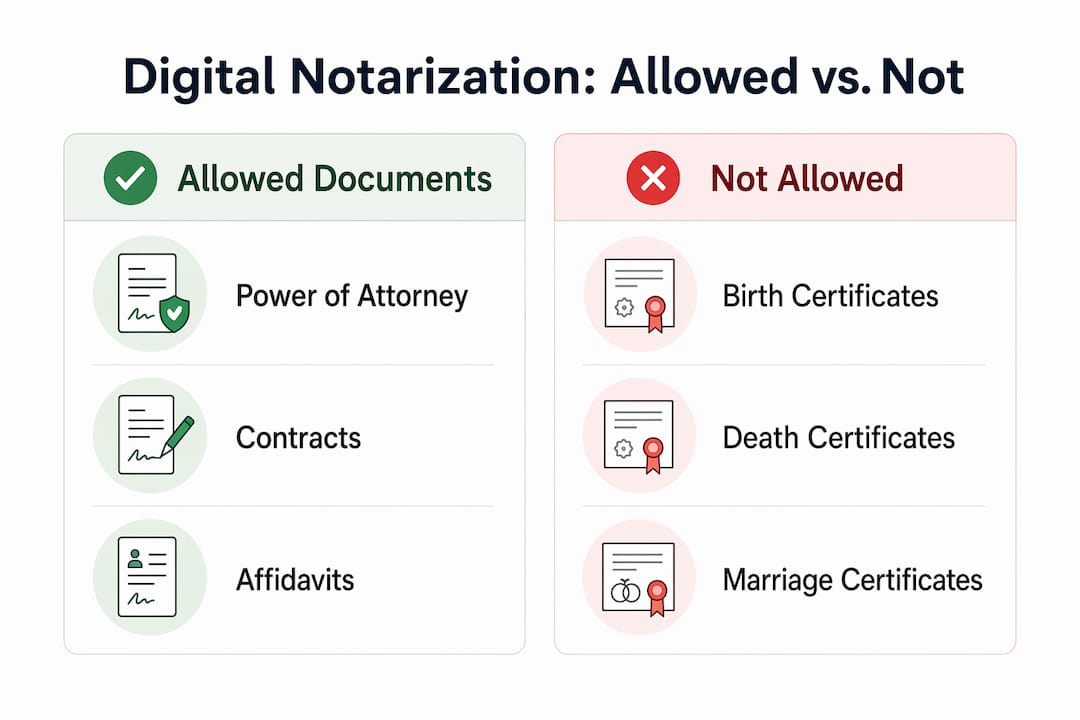
The table below summarizes when each approach applies:
| Scenario | Certified copy | Notarized digital copy or affidavit |
|---|---|---|
| Birth, death, marriage certificate | Yes, from government authority only | No, notary cannot certify these |
| Passport or government-issued ID copy | Not applicable | Yes, affidavit for copy of original |
| Corporate documents, contracts | Not applicable | Yes, notarized digital copy |
| Affidavits and statutory declarations | Not applicable | Yes, fully notarizable in digital format |
| Academic transcripts (unofficial) | Not applicable | Yes, affidavit for copy of original |
For anyone still unsure about when to request one over the other, the certified copy vs. notarized comparison from Theonlinenotary breaks it down clearly.
Understanding types of affidavits available in Ontario is also worth your time if you are dealing with immigration forms, real estate transactions, or family law matters, since each context has its own requirements.
Notarizing digital copies for signers with disabilities
Digital notarization has made the process significantly more accessible, but there are still specific procedures that apply when a signer cannot physically sign a document in the conventional sense.
Ontario law recognizes two primary accommodations:
- Signature by mark: A signer who cannot write their full signature may make a mark, such as an X, in the presence of the notary. The notary documents this in their notarial journal and notes the circumstances.
- Signature by proxy: If a signer is physically unable to sign or make a mark at all, another person may sign on their behalf and at their direction, in the presence of the notary. Both methods are legally valid and produce a notarization that stands up to legal scrutiny.
The notary’s journal entry plays a critical role here. It must document the accommodation used, the reason it was required, and the identity verification steps taken. This protects both the signer and the notary if the document is ever challenged.
Experts in the field consistently point out that inclusive signing methods promote accessibility without compromising legal validity. If you or someone you are assisting has a physical impairment, raise this with the notary before the session so they can prepare the correct journal entries and walk through the video session comfortably.
Pro Tip: For remote sessions involving a signer with a disability, contact the notary service in advance to discuss platform accommodations. Some RON platforms allow a support person to be present on the call, which can make the identity verification and signing steps significantly easier.
My take on digital notarization in Ontario
I’ve seen hundreds of document submissions fail at the last minute because someone didn’t know about the notarial certificate requirement. People spend weeks gathering documents, getting ID ready, and booking sessions, only to be turned away because their PDF has no jurat block. It’s entirely preventable, and it’s the single most common mistake I encounter.
The RIN versus RON distinction also matters far more than most people realize. I’ve worked with clients who mailed signed documents across the country, waited two weeks, and then discovered the receiving institution wanted a fully digital notarization with an audit trail. Choosing the right method upfront saves that entire cycle. If urgency or international acceptance is a factor, RON is almost always the better choice.
What I’d tell anyone starting this process: don’t treat digital notarization as a simpler version of in-person notarization. It involves identity proofing, video observation, and a digital audit trail. The technology is excellent when documents are prepared correctly. When they’re not, the process stalls just as badly as it would with paper. Prepare carefully, verify your document’s certificate language, flatten your PDF, and choose a service that offers real support if something goes wrong.
— Ken
Get your documents notarized online with Theonlinenotary
If you’ve been wondering how to get documents notarized online without the hassle of in-person appointments or mail delays, Theonlinenotary provides 24/7 online notary services in Ontario covering affidavits, statutory declarations, solemn declarations, invitation letters, certified copy affidavits, and more.

Every session includes secure identity verification, live audio-video witnessing, and a tamper-evident digital seal that satisfies Ontario’s legal requirements under Regulation 431/20. Whether you need to notarize a PDF document for immigration, a financial institution, or a court filing, the process takes minutes rather than days. The platform is built for both individuals and businesses, and support is available if your document type has specific requirements. Stop searching “can you do a notary online” and get it done today.
FAQ
What are digital copies for notarization?
Digital copies for notarization are electronic versions of documents that a commissioned notary authenticates using a digital seal and certificate, typically through a Remote Online Notarization platform. The document must already contain a valid notarial certificate or jurat block before the session begins.
Can you get a notary online in Ontario?
Yes, Ontario law under Regulation 431/20 permits Remote Online Notarization, where a notary and signer meet via audio-video technology and complete the entire process digitally. Services like Theonlinenotary offer this 24/7.
Can a notary certify a birth certificate in Ontario?
No. Notaries cannot certify copies of vital records like birth certificates. You must obtain certified copies of these records directly from ServiceOntario or the Office of the Registrar General.
What is the difference between RIN and RON?
Remote Ink-Signed Notarization (RIN) requires mailing a physically signed document to the notary, while Remote Online Notarization (RON) is a fully digital process with no paper involved, making RON faster and more widely accepted for urgent or international needs.
Do I need to flatten my PDF before online notarization?
Yes. Flattening your PDF removes editable form fields and creates a static, tamper-evident file that meets the technical requirements of most RON platforms and ensures legal acceptance.





