
TL;DR:
- Ontario residents can now efficiently obtain legally valid notarizations through secure online video sessions, eliminating traditional in-person visits. Preparation, including valid ID, proper documents, and a stable internet connection, is essential to ensure a smooth process. Online notarization enhances access, security, and convenience for legal document certification across Ontario.
Getting a document notarized used to mean booking time off work, driving across town, finding parking, and sitting in a waiting room for a 10-minute signature. For Ontario residents managing affidavits, statutory declarations, or invitation letters, that friction was real and unnecessary. The ontario notary online process changes that entirely. Through a secure video session with a licensed Ontario notary, you can get legally valid notarization from your home, your office, or anywhere with a decent internet connection. This guide walks you through exactly how it works, what to prepare, and what to watch out for.
Table of Contents
- What you need before starting your Ontario online notarization
- Step-by-step walkthrough of the Ontario online notary process
- Common mistakes to avoid and tips for a smooth online notarization
- Understanding which documents you can notarize online in Ontario
- Why embracing Ontario’s online notary process can transform your legal errands
- Get started with trusted Ontario online notary services today
- Frequently asked questions
Key Takeaways
| Point | Details |
|---|---|
| Prepare ID & device | Have a valid government-issued ID and a device with video ready before booking your online notarization. |
| Follow clear steps | Book, join the video call, verify your identity, sign documents, and receive notarized PDFs securely. |
| Check document types | Confirm your documents qualify for online notarization to avoid delays or in-person requirements. |
| Be physically in Ontario | You generally must be physically located in Ontario during your notarization session for it to be valid. |
| Online notary benefits | Save time and travel by using secure, legal, and convenient online notarization services in Ontario. |
What you need before starting your Ontario online notarization
Now that you know the importance of online notary services, let’s cover exactly what you need before you start. Walking into your session unprepared is the single most common reason people face delays. Think of it the same way you’d think about a job interview: showing up without the right materials wastes everyone’s time, including yours.
Identity documents you must have ready
At least one valid government-issued photo ID, such as a passport or driver’s license, is required for identity verification. Expired ID will not be accepted, and a health card alone is generally not sufficient. If your name on the document differs from your ID (say, a maiden name versus a married name), have secondary documentation ready to explain the discrepancy.
Technology requirements
A computer or smartphone with video capability and a stable internet connection are required for your session. This is not just a formality: the notary must see your face clearly, observe your signing in real time, and confirm your identity on camera. A flickering or frozen video feed can invalidate the session entirely.
Here is a quick checklist of what to have ready before your appointment:
- Valid, unexpired government-issued photo ID (passport, Ontario driver’s license)
- Device with a working camera, microphone, and speaker
- Stable internet connection (wired is more reliable than Wi-Fi if possible)
- Your document in PDF format, ready to be shared or e-signed
- A quiet, well-lit location where you can be seen clearly on camera
Document preparation matters more than most people realize
Your documents should be complete before the session. The notary is there to witness and certify, not to proofread or fill in blanks. Partially completed forms, missing dates, or illegible text create problems that require rescheduling. Follow step-by-step notarization instructions to format your files correctly before your appointment.

| Requirement | Details | Why it matters |
|---|---|---|
| Photo ID | Government-issued, valid, not expired | Legal identity verification |
| Device | Webcam, microphone, and stable connection | Video session cannot proceed without it |
| Document format | PDF preferred | Allows for electronic signature and clean delivery |
| Physical location | Must be in Ontario during the session | Ontario regulations require jurisdictional presence |
| Availability | Schedule adequate time (typically 15 to 45 minutes) | Rushed sessions increase error risk |
Pro Tip: Run a quick video call test with a friend or colleague the day before your notarization appointment. If your camera or microphone fails during the session, you may lose your booking slot.
For a deeper breakdown of what “secure” really means in this context, the secure online notarization guide covers encryption standards and what to expect from a compliant session.
Step-by-step walkthrough of the Ontario online notary process
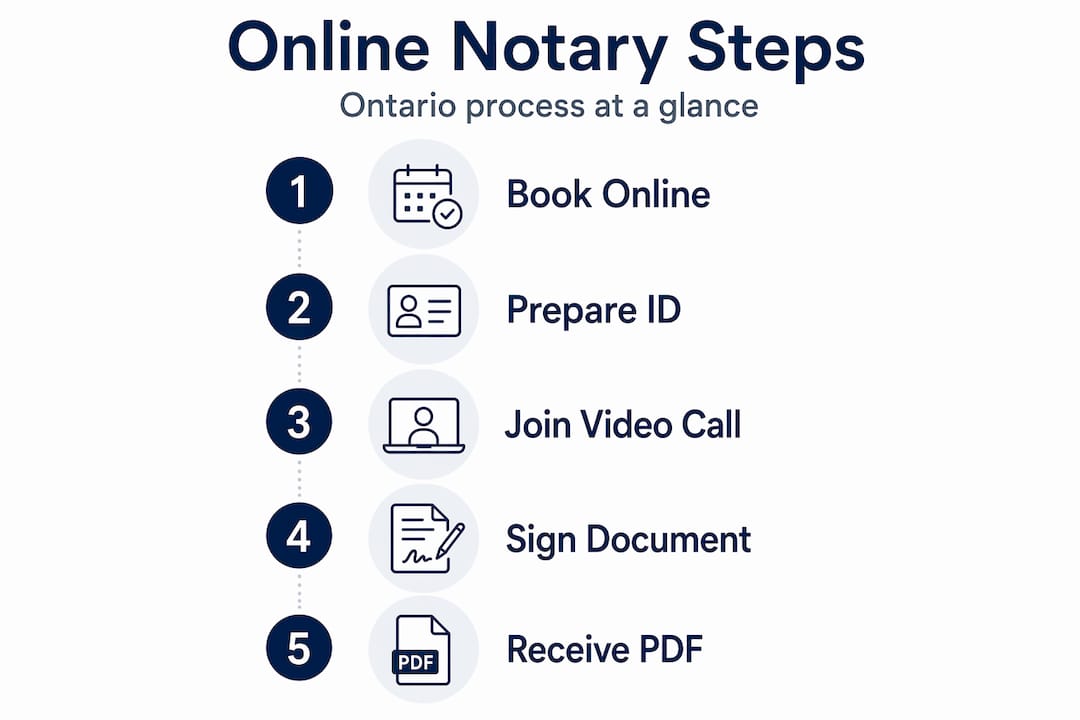
With your prerequisites ready, here is the exact step-by-step process to complete your online notarization.
The virtual notary workflow in Ontario is more structured than most people expect. It is not just a video call where someone watches you sign. There are defined legal steps that make the session valid and the resulting document enforceable.
Book your appointment. Choose a time slot through the online booking system. Many services offer same-day or next-day availability, which is one of the strongest advantages over traditional in-person appointments.
Join the secure video session. You will receive a link or login instructions. The session is conducted over an encrypted video platform that meets Ontario’s legal requirements. This is not Zoom or Google Meet: purpose-built online notary tools are used to maintain a compliant record of the session.
Verify your identity. Present your government-issued photo ID to the camera. The notary will confirm your identity by examining the ID, comparing it to your appearance, and asking identifying questions if needed.
Review and sign your documents. The notary will display the document for your review. You sign electronically, under the notary’s direct supervision, in real time. This supervised signing is what legally distinguishes notarization from a simple digital signature.
Receive your notarized documents. After the session, you receive your notarized documents as a secure PDF, quickly and through verified delivery. No waiting for mail, no courier fees.
| Step | Action | Typical time |
|---|---|---|
| Booking | Select appointment online | 2 to 5 minutes |
| Session start | Join video call, confirm identity | 5 to 10 minutes |
| Document review | Read and confirm document content | 5 to 15 minutes |
| Signing | Electronic signature under supervision | 2 to 5 minutes |
| Document delivery | Encrypted PDF sent to your email | Minutes after session |
Pro Tip: Do not sign your document before the session. The whole point of notarization is that the notary witnesses your signature in real time. A pre-signed document may be rejected and require you to start over.
If you are handling this for the first time, the how to get documents notarized online guide provides additional context on what each step looks like from the user’s side.
Common mistakes to avoid and tips for a smooth online notarization
After learning the process, it is important to know how to avoid common issues that can derail your online notarization session.
Most problems come down to preparation, or the lack of it. The online notary process in Ontario is efficient when you are ready. When you are not, small oversights create real delays.
The mistakes that trip people up most often:
- Expired or wrong ID. A driver’s license that expired six months ago will not pass. Check the expiry date before your appointment.
- Poor internet connection. If your video freezes or drops, the session cannot legally continue. Use a wired connection or position yourself close to your router.
- Documents that are not finalized. Blanks, missing pages, or unclear text means the session will need to be paused or rescheduled.
- Signing before the session. This is probably the most common misunderstanding. The notary must witness the signature. If you sign in advance, the notarization is void.
- Device issues. A camera that works for selfies may not perform well in a video call. Test it specifically in a video call context before your appointment.
Physical presence in Ontario during the appointment is required under Ontario regulations. This is a legal requirement, not a preference. If you are traveling outside the province and attempt to use an Ontario online notary service from another jurisdiction, the notarization will not be valid.
“The convenience of online notarization does not change the legal rigor of the process. The notary is still performing a regulated legal function. Your preparation is what makes it work smoothly.”
For readers with accessibility needs or scheduling constraints, the online notary accessibility resource explains how accommodations are handled in virtual sessions, including extended time and language support.
Understanding which documents you can notarize online in Ontario
Before you start, know which types of documents qualify for the online notary service in Ontario.
Not every legal document can be notarized online, and this is one of the most important things to confirm before booking. Online notary legalities in Ontario draw a clear line between documents that qualify for remote witnessing and those that legally require an original ink signature.
Documents commonly notarized online in Ontario:
- Affidavits
- Statutory declarations
- Solemn declarations
- Invitation letters for visa applications
- Consent letters for children traveling abroad
- Certified true copies of documents
- Power of attorney (in some circumstances)
Documents that may require in-person notarization:
- Real estate transfer documents (wet ink signature often required by land registry)
- Wills (Ontario law has specific execution requirements)
- Certain court filings where original signatures are mandated by the court
If you are unsure, the right move is to ask. Document suitability review is something a qualified online notary will gladly provide before you book your appointment. Do not assume your document qualifies; confirm it.
| Document type | Online notarization eligible | Notes |
|---|---|---|
| Affidavit | Yes | Standard, very common online |
| Statutory declaration | Yes | Widely accepted by Canadian institutions |
| Invitation letter | Yes | Common for immigration and visa purposes |
| Certified true copy | Yes | Requires original document be shown on camera |
| Will | Conditional | Check current Ontario regulations |
| Real estate documents | Often no | Land registry may require wet signatures |
For a full breakdown by document category, the document types for notarization guide is the most thorough resource available. If you are specifically dealing with travel-related paperwork, the invitation letter drafting resource walks through how to prepare that document before your session.
Why embracing Ontario’s online notary process can transform your legal errands
Having covered how to do it, here is why making the leap to online notarization is a smart move, and not just for the obvious reasons.
The standard argument for online notarization is convenience. Skip the drive, avoid the wait, save an afternoon. That is true, but it undersells what is actually happening here.
The deeper shift is geographic. Ontario is a massive province. A resident in Thunder Bay or Kenora has historically had far fewer notary options than someone in downtown Toronto. Online notary services erase that gap completely. A valid, legally compliant notarization is now equally accessible whether you are in a condo near the Eaton Centre or a farmhouse in Grey County. That is a genuine equity improvement in access to legal services.
Online notarization is far more secure, convenient, and efficient than traditional in-person methods. The security piece is frequently misunderstood. People assume that “in-person” means more secure. It does not. An encrypted video session with identity verification, a timestamped session record, and a tamper-proof PDF is arguably more verifiable than a paper document signed in a notary’s waiting room.
There is also a business case that does not get enough attention. Companies handling high volumes of declarations, affidavits, or employee documentation can reduce legal administrative time significantly by integrating online notarization into their workflow. For HR departments, legal teams, or businesses with remote employees across Ontario, the virtual notary process is not just faster: it is more compatible with how modern organizations actually operate.
The shift to online notarization in Ontario is not a trend. It is a structural change. The technology is mature, the legal framework supports it, and the practical advantages are undeniable. Waiting for it to “prove itself” further is just adding delay to things that already need to get done. Review the online notary legality in Ontario overview if you want to understand the specific regulatory basis for why these sessions are fully enforceable.
Get started with trusted Ontario online notary services today
You have now seen exactly how the online notary process in Ontario works, what to prepare, and what pitfalls to avoid. The next step is straightforward.

The Online Notary offers licensed, Ontario-based notary services for affidavits, statutory declarations, solemn declarations, invitation letters, and more. Booking takes minutes, sessions happen over encrypted video, and your notarized documents arrive by secure email, often the same day. Every session is conducted by a qualified Ontario notary who can also confirm whether your specific document types qualify before you commit to an appointment. If you have questions about compliance or legal validity, the online notary legality overview covers the regulatory details in plain language. Ready to book? Visit Ontario online notary services and get your documents handled today.
Frequently asked questions
Do I need to be physically located in Ontario to use online notary services?
Yes, you must be physically located in Ontario at the time of your appointment so the notary can lawfully perform the service under Ontario regulations.
What type of ID is required for online notarization in Ontario?
You need at least one valid government-issued photo ID, such as an Ontario driver’s license or passport, for identity verification during your session.
Can all legal documents be notarized online in Ontario?
Many documents like affidavits and statutory declarations qualify, but some require in-person signatures. Contact your notary with a brief description of your document to confirm eligibility before booking.
How do I receive my notarized documents after an online session?
You will receive your notarized documents as a secure PDF by email, along with any instructions needed for printing or presenting the document.
Are online notarizations legally valid in Ontario?
Yes. Online notary sessions are legal, secure, and comply with Ontario regulations when conducted by a licensed notary through a verified video platform.





